Distributed Training on AMD Instinct™ MI325X Clusters with dstack
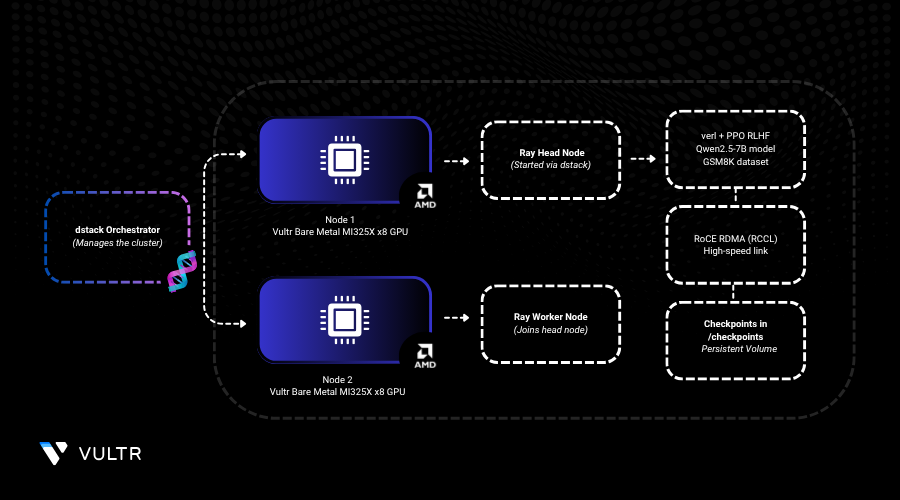
dstack is an open-source orchestrator purpose-built for AI as a streamlined alternative to Kubernetes and Slurm. It simplifies the orchestration of AI workloads across both VM and bare metal AMD clusters, so teams can focus on model development, not infrastructure.
This guide demonstrates how to use dstack to orchestrate distributed training on a cluster of Vultr’s Bare Metal instances with AMD GPUs. While dstack allows using any distributed framework, this guide uses verl, an open-source framework for reinforcement learning training. The purpose is to train Qwen2.5-7B-Instruct to solve grade school math word problems using the GSM8K dataset, which features 8.5K problems requiring 2–8 reasoning steps.
Prerequisites
To begin, install dstack by following the installation instructions. Once dstack server is up you can initialize your workspace.
CONSOLE
Create a Fleet for Your AMD GPU Cluster
Create a
mi325x-fleet.dstack.ymlfile.CONSOLECopy and paste the below configuration.
YAMLUnder
hosts, hostnames of the cluster nodes are listed.Save and close the file.
Apply the fleet configuration.
CONSOLEWhile creating a fleet, dstack automatically detects AMD GPUs and checks drivers on each node. Once the fleet is created, it's marked as idle and can be used for running dev environments, tasks, and services.
Validate Interconnect with RCCL tests
Before training, it’s important to validate multi-GPU and inter-node communication. dstack makes it convenient to launch RCCL tests across your cluster using a task.
Create
rccl-tests.dstack.ymlfile for distributed task configuration.CONSOLECopy and paste the below configuration.
YAML- This YAML file defines a dstack task to run RCCL performance tests on a 2-node AMD MI325X GPU cluster.
- It installs MPI and builds the RCCL test suite on the master node.
- The master node then launches an mpirun command to run all_reduce_perf across all GPUs.
- RDMA libraries are preloaded to enable high-speed interconnects.
- Worker nodes simply sleep to stay active while the test runs.
Save and close the file.
Run the task using the
dstack applycommand.CONSOLEAs the task runs, you’ll see the output of RCCL tests showing the bandwidth between the GPU and nodes.
Launch a Ray Cluster for Training
dstack tasks allow you to run any distributed workload directly using torch run, accelerate, or other distributed frameworks. However, because verl requires Ray, we need to launch a Ray cluster as a task before submitting Ray jobs.
Create a
ray-cluster.dstack.ymlto launch Ray cluster on the fleet.CONSOLECopy and paste the below configuration.
YAMLNote
You will need to build the verl-rocm Docker image as described in AMD’s ROCm blog.
Save and close the file.
Run the task using the
dstack applycommand.CONSOLEWhen the task exposes ports, the
dstack applycommand automatically forwards these ports to the current machine. In our case, this makes the Ray's dashboard available locally atlocalhost:8265.
Submit the Training Job via Ray
Install Ray locally.
CONSOLESubmit the traning job.
Monitor GPU metrics.
CONSOLEMonitoring GPU utilization and cluster health is crucial during training. dstack provides real-time metrics through both CLI and dashboard. Additionally, monitoring metrics is possible also via dstack server’s UI dashboard.
RoCE Compatibility and Checkpoint Recovery
Broadcom RoCE drivers require the libbnxt_re userspace library inside the container to be compatible with the host’s Broadcom kernel driver bnxt_re. To ensure this compatibility, we mount libbnxt_re-rdmav34.so from the host and preload it using LD_PRELOAD when running MPI.
All training checkpoints are saved to an instance volume, enabling seamless recovery in case of interruptions or node failures.
Conclusion
Leveraging AMD Instinct™ MI325X GPUs, ROCm, and dstack enables seamless, scalable, and high-performance distributed LLM training across your fleet. With dstack, you can avoid the operational complexity of managing infrastructure with Kubernetes or Slurm.
For more information:
- dstack Distributed tasks
- datack SSH fleets
- dstack’s Clusters guide
- Verl on ROCm blog


0 Comments
Be the first to comment and share your perspective with the community.