How to Establish a Private Connection Between Vultr and Google Cloud Platform (GCP)
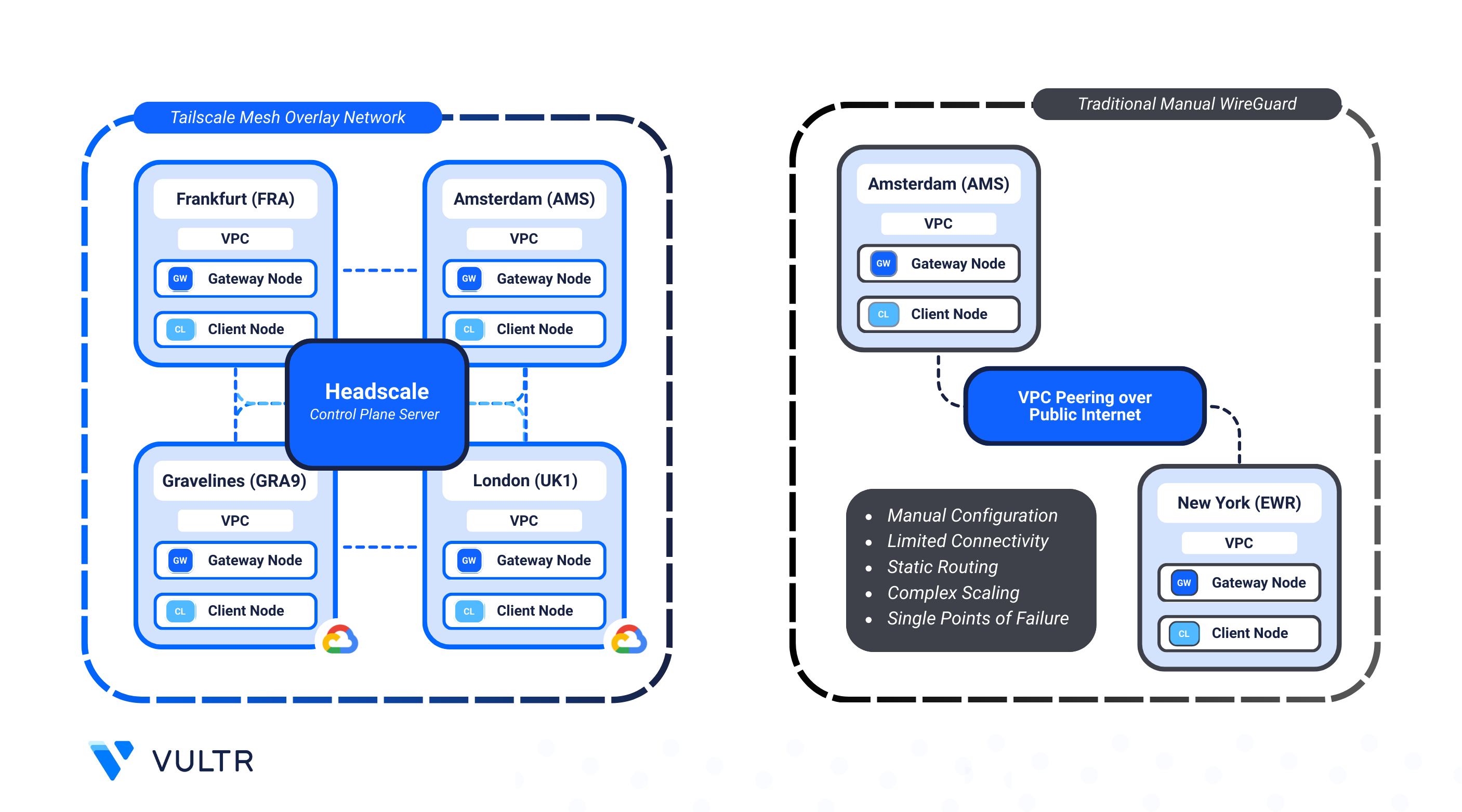
Modern hybrid cloud setups often require seamless, secure communication between services across cloud providers. While traditional VPNs can serve this purpose, they typically involve centralized architectures and complicated routing setups that may limit scalability and introduce latency.
Headscale, an open-source alternative to Tailscale's coordination server, allows you to self-host and manage your own Tailscale mesh VPN. Built on WireGuard, Tailscale creates direct, encrypted tunnels between endpoints without routing traffic through a central hub, delivering secure, low-latency networking with full control over device access and network rules.
By deploying lightweight gateway nodes in Vultr and Google Cloud Platform (GCP), and using Terraform and Ansible to handle provisioning and configuration, you can:
- Establish a private, encrypted mesh network between workloads across Vultr and GCP.
- Use self-hosted Headscale to manage identity, routing, and ACLs.
- Streamline deployment with automation for consistency and repeatability.
In this guide, you'll build a fully automated setup to connect Vultr and GCP environments using Headscale, enabling reliable peer-to-peer communication without relying on a traditional VPN gateway.
Prerequisites
Before you begin, you need to:
- Have access to a Linux-based instance as a non-root user with sudo privileges.
- Install the command-line tools needed for automation: Terraform, Ansible, and Git.
- Install Vultr CLI and Google Cloud CLI to interact with cloud services and list available regions.
Peer Vultr and GCP Using Headscale
Using Tailscale and a self-hosted Headscale controller, you can create a fully decentralized mesh VPN across cloud environments. This setup enables direct, encrypted communication between geographically or logically separated networks, including cloud providers like Vultr and GCP.
In this implementation, each cloud provider hosts a Gateway Node that participates in the mesh network. These gateways bridge their respective Virtual Private Clouds (VPCs), allowing traffic from internal application servers (Client Nodes) in one cloud to securely reach resources in the other, without exposing public services or relying on complex VPN hubs.
Key Components
- Headscale Controller: A self-hosted coordination server for Tailscale, responsible for authenticating peers and managing encrypted tunnels. In this guide, it's hosted on a Vultr instance.
- VPC Networks: Private, isolated subnets in both Vultr and GCP, each hosting their own workloads and a gateway node.
- Gateway Nodes: A
tailnetpeer or Tailscale client in each Vultr and GCP region to join the mesh network across multiple datacenters.. - Client Nodes: Regular application VMs residing in the VPC. They don’t run Tailscale; instead, the gateway handles traffic routing to and from the mesh.
- FRRouting (on Vultr): A routing daemon that announces and manages routes from the Tailscale gateway to other VMs in the Vultr VPC.
Automation With Terraform, Ansible, and Cloud-Init
This implementation is automated using Terraform, Ansible, and Cloud-Init, enabling consistent, repeatable deployments across Vultr and GCP with minimal manual configuration
- Terraform: Defines Vultr VPCs, GCP VPCs/subnets, gateway/client nodes on both the cloud platforms, the control server, and network plumbing. It also:
- Creates GCP custom routes for all Vultr VPC CIDRs with next hop set to the GCP gateway instance in the same VPC.
- Enables IP forwarding on GCP gateways (
can_ip_forward = true).
- Ansible: Enrolls only gateways (
tailscale_servers) into Headscale, advertises VPC subnets, approves routes on Headscale, and injects Tailscale routes into the main table while preserving each node's local VPC kernel route. - Cloud-Init: Used on gateways to install Tailscale and configure FRR (on Vultr) to expose the VPC network to the gateway.
- Startup Script: A reusable script is available for Vultr client nodes to automate Tailscale installation and onboarding. GCP client nodes do not require Tailscale or a startup script in this setup.
Provision a Private Network Mesh Between Vultr and GCP
In this section, you set up the infrastructure with Terraform and configure instances after deployment using the provided Ansible playbooks. The following example uses these regions to illustrate the peering mesh:
You can expand or reduce the regions to match your requirements. The design supports multiple Vultr and GCP locations in the same mesh.
Configure terraform.tfvars
Clone the GitHub repository and navigate to the
terraformdirectory undervpc-peering/vultr-gcp-regions.CONSOLEUpdate the
terraform.tfvarsfile with your credentials.CONSOLEPopulate your credentials and adjust regions if needed.
HCLNote
Populate the Vultr API Key and GCP Service Account Key in the
terraform.tfvarsfile to enable API access for provisioning resources.
Modifying or Expanding Regions
Adjusting regions allows you to scale deployments and optimize network performance.
- Change regions: Edit the
vultr_regionsandgcp_regionsmaps to redefine where gateway and client nodes deploy. - Control server location: Update
headscale_regionto move the Headscale server to a different region. Theinstance_planandinstance_os_idvalues are pre-selected to achieve maximum performance and ensure software compatibility. - Add new regions: Insert additional entries in the
vultr_regionsorgcp_regionsmaps. Terraform automatically iterates through all listed regions to provision nodes.
This setup has been validated on Ubuntu 22.04, which is recommended for stability, security, and consistent results.
Note
Tips for Region Selection:
List available Vultr regions using the API to choose appropriate datacenter locations for your instances.
CONSOLEList all GCP regions and zones with the gcloud CLI to determine where to deploy your VPCs and instances.
CONSOLE
Initialize and Apply Terraform
Initialize the Terraform working directory.
CONSOLEThe command above sets up Terraform and downloads any required providers.
Review the execution plan.
CONSOLEApply the Terraform manifests.
CONSOLEYour output should look similar to the one below:
When prompted, type yes to approve and apply the configuration. Provisioning may take up to 5 minutes depending on the number of regions.
Outputs:
These outputs provide important information about your deployed infrastructure:
Client and Gateway Summaries
client_summary: Contains details of all client nodes (Vultr and GCP), including Name, Private IP, Public IP, Provider, and Subnet.gateway_summary: Contains details of all gateway nodes with the same information.
Headscale Control Server IP
headscale_control_server_ip: Shows the public IP of the Headscale control server, which coordinates the mesh network.
Run Ansible Playbooks
Navigate to the Ansible directory:
CONSOLENote
Terraform automatically generates an
inventory.ymlfile in this directory. Ansible uses this file to configure the mesh network, listing all Vultr and GCP gateway and client nodes.Run the Ansible Playbook to configure the private network mesh.
CONSOLEThis playbook waits for SSH and cloud-init, creates Headscale users and preauth keys for each gateway, enrolls the gateways into Headscale while advertising their VPC subnets, approves routes, enables IP forwarding, and updates the main routing table without affecting existing VPC routes.
Note
To manually add more clients to the mesh network:
Vultr: During instance provisioning, select the
vultr-x-gcp-mesh-scriptstartup script and choose the corresponding VPC under VPC Networks. The script automatically configures the instance and adds all OSPF-announced routes. This startup script currently supports only Debian and RHEL instances.GCP: When provisioning, select the respective VPC. No additional installation is required because the GCP VPC routes already contains the necessary routes.
Test and Benchmark the Private Network Mesh
Once deployment is complete, confirm that all Vultr and GCP regions are connected through the WireGuard mesh controlled by Headscale. Run the included Ansible playbooks to test both private and public routes, and capture metrics such as latency, throughput, and overall mesh stability.
Run the provided Ansible playbook to execute
iperf3andpingtests between regions using both private and public IPs.CONSOLENote
The network tests may take 5-10 minutes to complete, depending on the number of regions being tested.
After completion, the playbook creates a
network_test_results/directory which contains the following results files:network_results.txt: Consolidated output of all tests, including latency and bandwidth for public and private paths.public_results_table.txt: Tabular summary of region-to-region performance over the public internet.private_results_table.txt: Tabular summary of private mesh performance via Headscale.
Review the test results for the public internet performance between nodes.
CONSOLEYour output should be similar to the one below:
Review the Private IP test results to validate the performance over the Tailscale mesh.
CONSOLEYour output should be similar to the one below:
Note
Public tests usually show higher speeds due to direct internet routing and optimized infrastructure. Private mesh tests use encrypted WireGuard tunnels, which add overhead and may reduce throughput.
Conclusion
This guide demonstrated how to establish a secure, multi-region private mesh network between Vultr and GCP using Headscale and Tailscale. By leveraging Terraform and Ansible, you automated provisioning and configuration to ensure consistent deployments across regions. Gateway and client nodes exchanged traffic over encrypted, low-latency tunnels, while FRRouting and GCP custom routes enabled seamless cross-datacenter connectivity.


0 Comments
Be the first to comment and share your perspective with the community.