How to Set Up High Availability Using Vultr Reserved IP and BGP
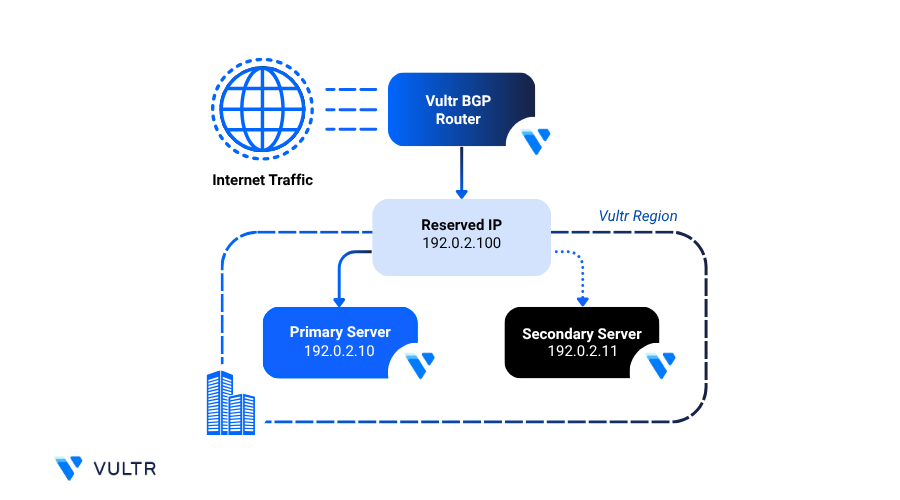
Setting up high availability ensures that your application remains accessible, even if one of your instances becomes unavailable. On Vultr, you can set up high availability by combining Reserved IPs with Border Gateway Protocol (BGP) routing. This setup enables automatic traffic failover between multiple compute instances within the same region.
This guide explains how to configure Reserved IPs with BGP using BIRD 2.0, a high-performance BGP routing daemon with enhanced security and performance features.
Note
Setting up high availability with Reserved IPs is only supported when the servers are located within the same region. It does not function across multiple regions.
Prerequisites
Before you begin, ensure you:
Have access to BGP on your Vultr account. If BGP is not enabled, request access through the Vultr Console.
Have access to Reserved IPv4 and IPv6 addresses to use with BGP.
Have access to two Ubuntu 24.04 instances deployed in the same region.
Note
This guide uses two compute instances for demonstration, but you can configure additional instances based on your infrastructure needs.
Reference Configuration Values
This guide uses the following example values. Replace these with your actual IP addresses as needed:
- Server 1
- IPv4 address:
192.0.2.2 - IPv6 address:
2001:db8:1234:5678::1
- IPv4 address:
- Server 2
- IPv4 address:
192.0.2.3 - IPv6 address:
2001:db8:1234:5678::2
- IPv4 address:
- Reserved IPs
- IPv4:
192.0.2.4/32 - IPv6:
2001:db8:1234:5678::3/64
- IPv4:
Vultr BGP Information
Use the following BGP configuration values to configure your setup, depending on whether you're using Cloud Compute instance or Bare Metal instance.
Configure High Availability with Reserved IP
In this section, you have to configure Reserved IPs by creating a virtual network interface, installing and configuring BIRD 2.0 for BGP routing, and verifying connectivity with Vultr's BGP service. This setup allows your Reserved IP to move between instances, enabling high availability and automatic failover within the same region.
Create a Virtual Interface for Reserved IP
Create a new virtual network interface on each instance and assign your Reserved IPv4 and IPv6 addresses to it. This allows the server to handle traffic for the Reserved IP, even if it’s not the primary network interface.
Create a new virtual network interface.
CONSOLEBring up the
ha-ipinterface.CONSOLEAssign your Reserved IP addresses to the interface.
CONSOLEReplace
192.0.2.4and2001:db8:1234:5678::3/64with your actual Reserved IPv4 and IPv6 addresses.Verify the interface configuration.
CONSOLEYour output should be similar to the one below:
Configure BIRD 2.0 - BGP Routing Daemon
Follow these steps to install and configure BIRD 2.0, a BGP routing daemon that advertises your Reserved IP addresses using BGP.
Allow incoming BGP traffic on TCP port
179.CONSOLEConfirm that the firewall is active and port
179is allowed through.Update the server package index.
CONSOLEInstall the BIRD 2.0 package.
CONSOLEView the installed BIRD version.
CONSOLEThis above command displays the installed version of BIRD.
Back up the default BIRD configuration.
CONSOLEEdit the BIRD configuration file.
CONSOLEReplace the file contents with the following configuration.
INIIn the above configuration:
- router id: Set this to your server's main IPv4 address.
- protocol device: Enables BIRD to track kernel network interfaces.
- protocol direct: Advertises directly connected IP addresses on the
ha-ipinterface. - protocol kernel: Synchronizes routes between the kernel and BIRD. Both IPv4 and IPv6 routes are exported to the system's routing table.
- protocol static: Enables static routing entries for both IPv4 and IPv6 (required even if empty).
- protocol bgp vultr_ipv4: Configures the BGP session for IPv4.
- local as: Set this to private BGP ASN assigned by Vultr team.
- source address: Set to your server's IPv4 address.
- neighbor: Set to Vultr's BGP IPv4 neighbor IP (
169.254.169.254) and ASN (64515). - password: Use the BGP session password provided by Vultr Support.
- protocol bgp vultr_ipv6: Configures the BGP session for IPv6.
- local as: Set this to private BGP ASN assigned by Vultr team.
- source address: Set to your server's IPv6 address.
- neighbor: Set to Vultr's BGP IPv6 neighbor IP (
2001:19f0:ffff::1) and ASN (64515). - password: Use the same BGP session password provided by Vultr Support.
Restart BIRD 2.0 service to apply the configuration changes.
CONSOLE
Verify BGP Connectivity
After configuring BIRD, verify that your BGP sessions are successfully established with Vultr's neighbor peers. A successful connection indicates that your Reserved IPs are now being advertised to Vultr's routing system.
Check the BGP session status for IPv4 and IPv6.
CONSOLEYour output should be similar to the one below:
If both sessions show
State: upandBGP state: Established, BIRD is successfully connected to Vultr's BGP peers.Verify that BIRD is advertising the Reserved IP routes.
CONSOLEYour output should be similar to the one below:
This confirms that your Reserved IPv4 and IPv6 addresses are bound to the
ha-ipinterface and advertised to the network.
Test the High Availability
Use the steps below to test if your Reserved IP fails over correctly and responds to traffic as expected.
Open a new terminal on your local machine and ping the Reserved IPs.
CONSOLEYour output should be similar to the one below:
This confirms the Reserved IPs are reachable from outside your instance.
On the primary instance, bring down the virtual interface (
ha-ip).CONSOLEThe ping command in your second terminal should stop receiving replies, simulating a failure.
Bring the
ha-ipinterface back up.CONSOLEThe ping should resume, confirming that traffic correctly routes through the instance when the interface is up.
Note
Repeat all the above steps on each instance you plan to include in the high availability configuration to validate failover behavior across all nodes.
Use BGP Prepends to Assign Traffic Priority
When using BGP for high availability, you can control which server receives traffic by adjusting AS path lengths. BGP routers prefer routes with the shortest AS path. By prepending your local ASN, you artificially lengthen the path and deprioritize a specific instance.
In this example, you:
Configure Server One as the primary instance, which receives traffic by default.
Configure Server Two as the secondary instance, which receives traffic only when Server One is unavailable.
Follow the steps below to use AS path prepending on the secondary server to reduce its routing preference.
Update the BIRD 2.0 configuration on your secondary server.
CONSOLEAdd a BGP prepend filter to the export block in both the IPv4 and IPv6 protocol definitions.
INIReplace
<BGP-Private-Instance-ASN>with your actual BGP AS number assigned by Vultr.Your updated BGP configuration for the second server should look like below.
IPv4
INIIPv6
INI
This configuration ensures that the secondary instance advertises a longer AS path, making it less preferred for incoming traffic. If the primary instance goes offline, BGP automatically fails over to the secondary route.
Note
You can prepend the local ASN multiple times to further reduce a server’s priority.
Persist the ha-ip Virtual Interface Configuration
Manually created virtual interfaces and IP assignments are lost after a reboot. To persist the ha-ip interface and Reserved IPs, configure them with systemd-networkd for a reliable, service-managed high-availability setup.
Create the virtual interface definition.
CONSOLEAdd the following network configuration.
INICreate the network configuration file for Reserved IP assignment.
CONSOLEAdd the following configuration.
INIReplace the IP addresses with your actual Reserved IPv4 and IPv6 addresses.
Enable and start the
systemd-networkdservice.CONSOLEView the status of the
systemd-networkdservice.CONSOLEThe status of the service must be active and running.
Ensure the dummy kernel module loads at boot.
CONSOLEThis ensures the dummy module is available and preconfigured after every reboot.
Conclusion
In this guide, you configured a high availability environment on Vultr using Reserved IPs and BGP routing. You created a virtual interface for the Reserved IPs, advertised the routes using BGP, adjusted traffic priority with AS path prepending, and ensured the configuration persists across system reboots. This setup allows seamless traffic failover between multiple instances in the same region, ensuring continuous service availability in case of node failure.


0 Comments
Be the first to comment and share your perspective with the community.