How to Manage KV Cache in NVIDIA Dynamo
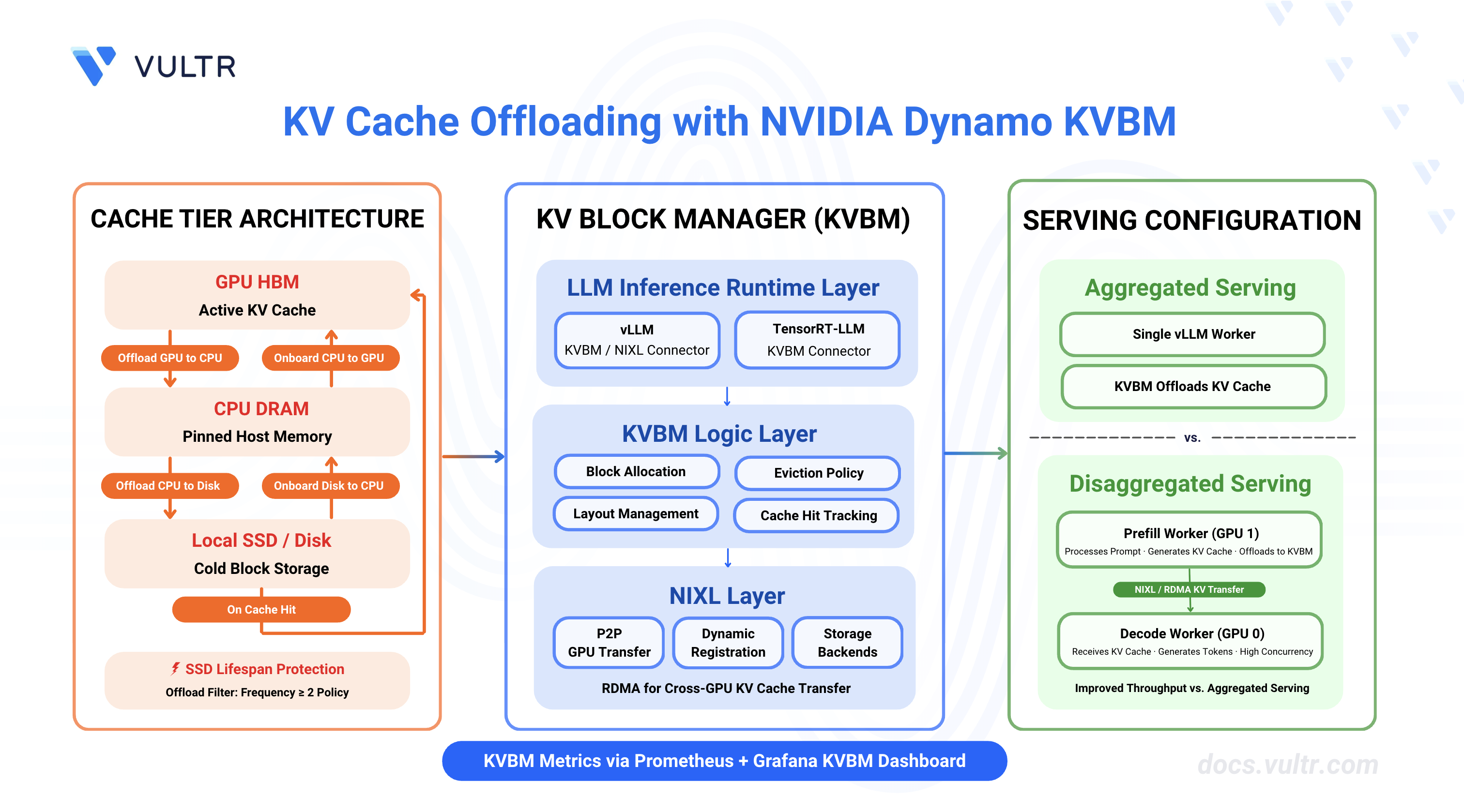
NVIDIA Dynamo is an open-source, high-throughput, low-latency inference framework designed to deploy large-scale generative AI and reasoning models across multi-node, multi-GPU environments. It optimizes datacenter-scale AI workloads by boosting LLM inference efficiency and reducing time-to-first-token (TTFT) through intelligent resource management, dynamic GPU allocation, and distributed orchestration.
This guide covers configuring and deploying the NVIDIA Dynamo KV Block Manager (KVBM) for efficient KV cache management across aggregated and disaggregated serving configurations. It focuses on cache tier architecture setup (GPU→CPU→Disk), environment variable configuration, and integration with vLLM and TensorRT-LLM backends to reduce KV cache recomputation, improve TTFT, and increase throughput.
Prerequisites
Before you begin, ensure you:
- Have access to a Linux server with NVIDIA GPUs installed and the NVIDIA Container Toolkit configured. Use a non-root user with sudo privileges.
- 1 GPU minimum for aggregated serving.
- 2 GPUs minimum for disaggregated serving.
- Install Docker Engine and Docker Compose.
- Create a Hugging Face account and generate an access token for gated models like Llama.
Understanding KVBM (KV Block Manager)
The Dynamo KV Block Manager (KVBM) is a scalable runtime component that handles memory allocation, management, and remote sharing of Key-Value (KV) blocks for inference tasks across heterogeneous and distributed environments. KVBM enables KV cache offloading from GPU memory to CPU memory and disk storage, avoiding expensive recomputation of KV cache data when GPU memory is constrained.
KVBM provides a unified memory API spanning GPU memory, pinned host memory, and local/distributed storage systems. It integrates with NIXL, a dynamic memory exchange layer for remote registration, sharing, and access of memory blocks across GPUs.
KVBM Architecture
KVBM has three primary logical layers:
LLM Inference Runtime Layer includes inference runtimes (vLLM, TensorRT-LLM) that integrate through dedicated connector modules to the Dynamo KVBM. These connectors act as translation layers, mapping runtime-specific operations and events into KVBM's block-oriented memory interface.
KVBM Logic Layer encapsulates core KV block manager logic and serves as the runtime substrate for managing block memory. This layer implements table lookups, memory allocation, block layout management, lifecycle state transitions, and block reuse/eviction policies.
NIXL Layer provides unified support for all data and storage transactions. NIXL enables P2P GPU transfers, RDMA and NVLink remote memory sharing, dynamic block registration and metadata exchange, and provides a plugin interface for storage backends including block memory (GPU HBM, Host DRAM, Local SSD).
Cache Tier Architecture
KVBM supports three cache tier configurations:
When to Use KV Cache Offloading
KV cache offloading is most effective when cache reuse outweighs the overhead of transferring data between memory tiers. It provides significant benefits in:
Clone the Dynamo Repository
NVIDIA Dynamo provides deployment scripts, container utilities, and orchestration modules required to run KVBM-enabled inference workloads. Clone the repository to access the deployment assets and container runtime scripts.
Clone the repository.
CONSOLENavigate to the repository directory.
CONSOLESwitch to the latest stable release.
CONSOLEThe command checks out the stable release. Visit the Dynamo releases page to find the latest stable release version.
Start Infrastructure Services
Dynamo's KVBM component relies on etcd for worker registry and service discovery. The Docker Compose configuration launches etcd with exposed ports for client connections (2379-2380). The etcd service must run continuously for KVBM to coordinate worker resources and manage distributed KV cache state.
Start the infrastructure services.
CONSOLEVerify the services are running.
CONSOLEAll containers should be up and running with exposed ports for etcd and NATS.
Verify CUDA Version and Pull Container Image
The vLLM container requires a CUDA version match between the host driver and container runtime to prevent GPU kernel incompatibilities. The NVIDIA Container Toolkit maps host GPUs into containers, requiring the container's CUDA version to align with the host driver's supported version.
Check the installed CUDA version.
CONSOLEThe output displays the CUDA version in the top-right corner of the table.
Pull the vLLM container image from NGC. Match the CUDA version in the image tag to your system's CUDA version.
For CUDA 13.x, use:
CONSOLEFor CUDA 12.x, use:
CONSOLE
Note
Visit the NVIDIA NGC Catalog to view all available image tags and CUDA versions.
(Optional) Build the container from source instead of pulling the pre-built image.
CONSOLEThe build process creates an image named
dynamo:latest-vllm. If you prefer using this locally built image, replacenvcr.io/nvidia/ai-dynamo/vllm-runtime:0.9.0-cuda13withdynamo:latest-vllmin all subsequent commands.
Configure Hugging Face Cache Permissions
The container runs as UID 1000 and requires write access to the Hugging Face cache directory for model downloads. Incorrect permissions prevent the container from accessing cached model weights, causing worker initialization failures.
Create the cache directory if it does not exist.
CONSOLESet ownership to the container user (UID 1000).
CONSOLESet appropriate permissions.
CONSOLE
Configure Cache Tier Environment Variables
KVBM cache tiers are configured using environment variables that control the size and behavior of CPU and disk cache layers. Configure these variables before starting the Dynamo workers to enable KV cache offloading.
Cache Tier Configuration Examples
Option 1: GPU → CPU Offloading - Offload KV cache from GPU to pinned host memory (CPU). This provides fast access with CPU DRAM capacity.
Option 2: GPU → CPU → Disk Tiered Offloading - Offload KV cache from GPU to CPU, then from CPU to disk. This provides maximum capacity with tiered performance.
Option 3: GPU → Disk Direct Offloading (Experimental) - Offload KV cache directly from GPU to disk, bypassing the CPU tier. This is experimental and may not provide optimal performance.
SSD Lifespan Protection
When disk offloading is enabled, disk offload filtering is enabled by default to extend SSD lifespan. The current policy only offloads KV blocks from CPU to disk if the blocks have frequency ≥ 2. Frequency doubles on cache hit (initialized at 1) and decrements by 1 on each time decay step.
To disable disk offload filtering:
Deploy KVBM with vLLM: Aggregated Serving
Aggregated serving with KVBM combines prefill and decode phases on a single worker while enabling KV cache offloading to CPU and disk tiers. This configuration suits single-GPU or small multi-GPU environments where KV cache reuse provides performance benefits without the complexity of disaggregated serving.
Export your Hugging Face token to avoid rate limitations when downloading large models. Replace
YOUR_HF_TOKENwith your actual token.CONSOLERun the vLLM container with GPU access and workspace mounting. Use the image tag that matches your CUDA version from the previous section.
CONSOLEThe command starts an interactive container session with GPU support and passes the Hugging Face token to the container. The
--use-nixl-gdsflag enables NIXL with GPU Direct Storage support for efficient KV cache offloading.Inside the container, create environment configuration for KVBM.
CONSOLEYou can use any of the Cache Tier Configuration options (GPU→CPU, GPU→CPU→Disk, or GPU→Disk) mentioned in the previous section based on your requirements.
Create a custom launch script for aggregated serving with KVBM.
CONSOLEThe script configures the vLLM worker with
--connector kvbm, which integrates KVBM for KV cache management. The connector enables both KV cache offloading to CPU/disk and onboarding back to GPU on the same worker.Make the script executable.
CONSOLERun the aggregated serving script with KVBM.
CONSOLEThe script starts a frontend service on port
8000and a vLLM worker with KVBM enabled using 20GB of CPU cache for offloading (defaults to NVIDIA Nemotron Nano 4B).Open a new terminal session on your server (outside the container).
Test with a chat completion request.
CONSOLEThe output displays the model's chat response in JSON format.
Monitor the container logs to verify KVBM is operational. The logs display model discovery, KV event consolidator connection, and cache statistics.
The logs confirm:
- Model registration with Dynamo discovery
- ZMQ listener connection for KV event consolidation
- KVBM cache statistics showing host and disk cache hit rates
KVBM is now operational and ready to offload KV cache to CPU/disk tiers, reducing prefill computation time for subsequent requests with overlapping prompts.
Note
This guide uses vLLM for examples, but KVBM works with both vLLM and TensorRT-LLM backends. For TensorRT-LLM configuration, see the KVBM Guide. SGLang is not currently supported by KVBM. For the complete feature support matrix, see the NVIDIA Dynamo KVBM documentation.
Deploy KVBM with vLLM: Disaggregated Serving
Disaggregated serving with KVBM enables prefill workers to offload KV cache to CPU/disk tiers and share the cache with decode workers via NIXL. This configuration maximizes throughput by allowing decode workers to receive precomputed KV cache from prefill workers while benefiting from KVBM's cache management capabilities.
Exit the container if you are still inside from the previous section. Press
Ctrl+Cto terminate the running process, then pressCtrl+Dto exit the container.Export your Hugging Face token. Replace
YOUR_HF_TOKENwith your actual token.CONSOLERun the container with the image tag that matches your CUDA version.
CONSOLEThe
--use-nixl-gdsflag enables NIXL with GPU Direct Storage support for efficient KV cache transfer between prefill and decode workers.Inside the container, create environment configuration for KVBM.
CONSOLEDisaggregated serving uses 40GB of CPU cache (double the aggregated configuration) to accommodate the larger memory requirements of running separate prefill and decode workers. You can use any of the Cache Tier Configuration options (GPU→CPU, GPU→CPU→Disk, or GPU→Disk) mentioned in the previous section based on your requirements.
Create a custom launch script for disaggregated serving with KVBM.
CONSOLEThe script uses the
--connector kvbm nixlflag on the prefill worker, which combines KVBM for KV cache offloading and NIXL for KV cache transfer to decode workers. The decode worker uses--connector nixlto receive KV cache from the prefill worker.Make the script executable.
CONSOLERun the disaggregated serving script with KVBM.
CONSOLEThe script starts the frontend service on port
8000, a decode worker on GPU0using NIXL connector for KV cache transfer, and a prefill worker on GPU1with KVBM enabled for KV cache offloading and sharing via NIXL. KVBM cache configuration is loaded from~/kvbm.env.Open a new terminal session on your server (outside the container).
Test the disaggregated deployment.
CONSOLEVerify KVBM and disaggregated serving are operational by checking the container logs.
The logs confirm that KVBM is operational with KV Event Consolidator enabled, NIXL compatibility verified, and cache statistics being tracked. The prefill worker processes the prompt and offloads KV cache to KVBM. The decode worker receives the KV cache via NIXL and generates tokens.
Enable KVBM Metrics and Monitoring
KVBM provides detailed metrics about cache offloading, onboarding, and hit rates. Enable metrics collection and visualize them in Grafana to monitor KVBM performance.
Deploy the Monitoring Stack
Follow the How to Enable Observability in NVIDIA Dynamo Inference Pipelines guide to deploy the monitoring stack (Prometheus, Grafana, Tempo, DCGM Exporter).
Enable KVBM Metrics
To enable KVBM metrics, add the following environment variables to your ~/kvbm.env configuration file:
BASH
After updating the configuration, restart your KVBM deployment (aggregated or disaggregated) using the launch scripts. The KVBM metrics will be exported to Prometheus and can be visualized in the Grafana KVBM Dashboard.
View KVBM Metrics in Grafana
Access Grafana at http://localhost:3000 and navigate to the KVBM Dashboard to view metrics including:
- Matched Tokens: Number of tokens matched from KV cache.
- Offload Blocks D2H: KV blocks offloaded from Device (GPU) to Host (CPU).
- Offload Blocks H2D: KV blocks offloaded from Host (CPU) to Disk.
- Onboard Blocks H2D: KV blocks onboarded from Host (CPU) to Device (GPU).
- Host Cache Hit Rate: Percentage of KV cache hits in CPU memory (0.0-1.0).
- Disk Cache Hit Rate: Percentage of KV cache hits in disk storage (0.0-1.0).
High cache hit rates and onboard block counts indicate effective KV cache reuse, which translates to reduced prefill computation and improved TTFT.
Note
For detailed information about KVBM metrics configuration, available metrics, and troubleshooting, see the NVIDIA Dynamo KVBM Metrics Guide.
Conclusion
You have successfully configured and deployed KVBM for KV cache management in NVIDIA Dynamo. The aggregated serving configuration enables KV cache offloading on a single worker, while the disaggregated serving configuration combines KVBM with NIXL for efficient cache sharing between prefill and decode workers. KVBM's tiered cache architecture (GPU→CPU→Disk) reduces KV cache recomputation, improves TTFT, and increases throughput for workloads with cache reuse patterns. For more advanced configurations, including LMCache integration, FlexKV, and SGLang HiCache, refer to the official NVIDIA Dynamo KVBM documentation.


0 Comments
Be the first to comment and share your perspective with the community.