How to Enable Observability in NVIDIA Dynamo Inference Pipelines
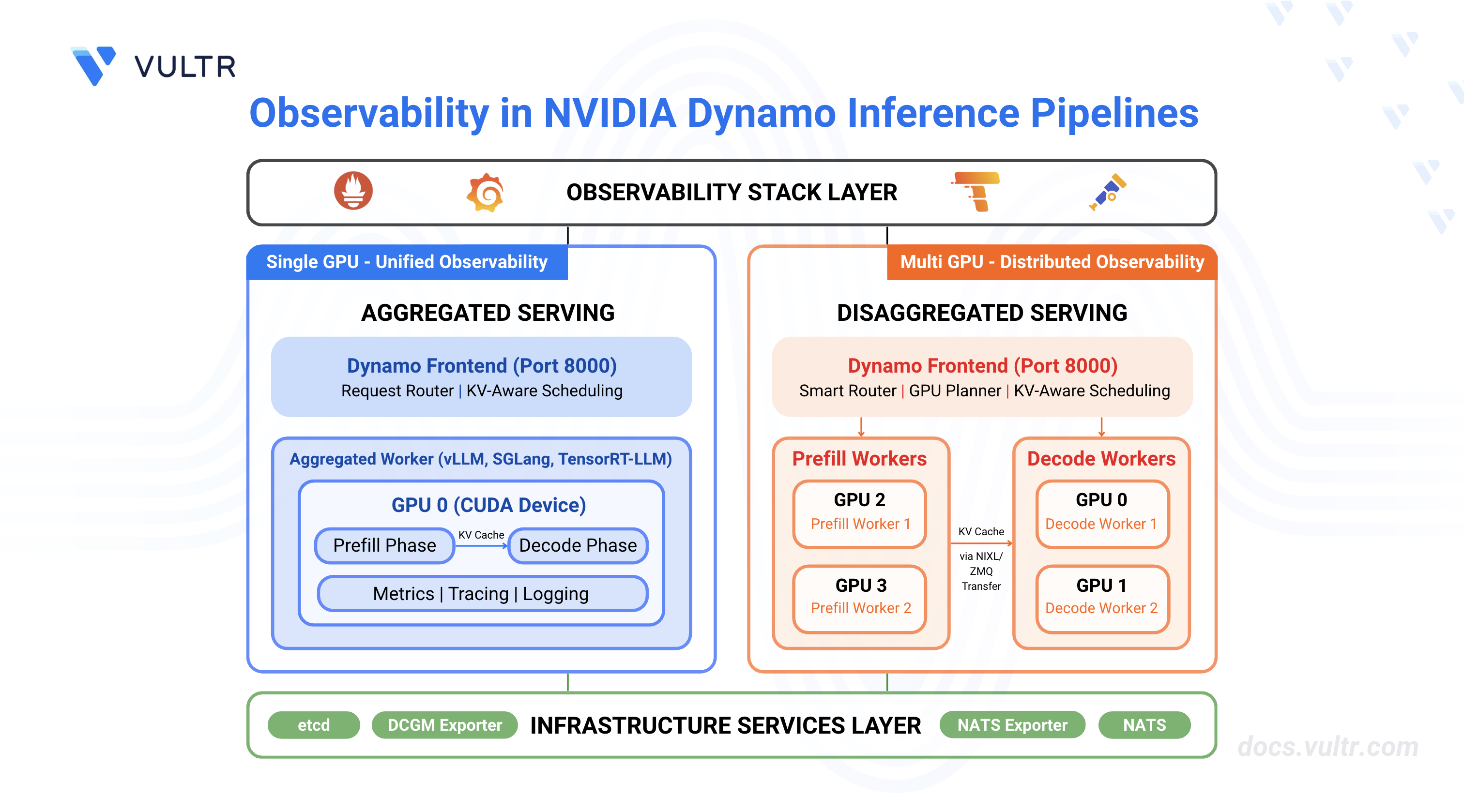
NVIDIA Dynamo is an open-source inference framework for deploying large-scale generative AI models across multi-node, multi-GPU environments. Distributed inference systems require comprehensive observability to track request flows, monitor resource utilization, and troubleshoot failures across multiple workers. Dynamo provides built-in observability through metrics (Prometheus), distributed tracing (OpenTelemetry/Tempo), and structured logging.
This guide covers enabling and configuring observability in NVIDIA Dynamo inference pipelines for both aggregated serving (single-worker) and disaggregated serving (separate prefill/decode workers), providing visibility into request latency, token throughput, KV cache performance, and system health.
Prerequisites
Before you begin, ensure you:
- Have access to a Linux server with NVIDIA GPUs installed and the NVIDIA Container Toolkit configured. Use a non-root user with sudo privileges.
- 1 GPU minimum for aggregated serving.
- 4 GPUs for disaggregated serving.
- Install Docker Engine and Docker Compose.
- Create a Hugging Face account and generate an access token for gated models like Llama.
Understanding NVIDIA Dynamo Observability
Observability in NVIDIA Dynamo provides comprehensive monitoring capabilities through three interconnected systems that work together to provide visibility into inference pipeline performance and behavior.
Metrics expose quantitative measurements through Prometheus endpoints on each Dynamo component. The frontend service exposes metrics including request counts, token processing rates, time-to-first-token (TTFT), and inter-token latency on port 8000. Backend workers expose component-level metrics including request duration, inflight requests, and KV cache statistics on their system status ports (default: 8081). The metrics system uses the Prometheus exposition format and includes labels (
dynamo_namespace,dynamo_component,dynamo_endpoint) to identify metric sources. All Dynamo-generated metrics use thedynamo_*prefix for consistent identification.Tracing provides distributed request flow visualization using OpenTelemetry and Tempo. When enabled, Dynamo creates trace spans that follow requests across the frontend, prefill workers, and decode workers. Each trace includes a root
http-requestspan from the frontend, aprefill_routingspan for routing decisions, andhandle_payloadspans for prefill and decode operations. Traces use OpenTelemetry Protocol (OTLP) to export data to Tempo, where Grafana displays flame graphs showing request timelines, component interactions, and processing durations. Traces include correlation IDs through thex-request-idheader, enabling request tracking across distributed components.Logging captures structured event data in JSONL format with trace context. When JSONL logging is enabled, each log entry includes
trace_id,span_id, andx_request_idfields that correlate logs with traces. The logging system supports configurable verbosity levels (ERROR, WARN, INFO, DEBUG, TRACE) and target-specific filtering. Logs are written to stderr and can be collected by log aggregation systems for centralized analysis.
Clone the Dynamo Repository
NVIDIA Dynamo provides deployment scripts, container utilities, and orchestration modules required to run inference workloads. Clone the repository to access the deployment assets and container runtime scripts.
Clone the repository.
CONSOLENavigate to the repository directory.
CONSOLESwitch to the latest stable release.
CONSOLEThe command checks out the stable release. Visit the Dynamo releases page to find the latest stable release version.
Start Infrastructure and Observability Services
Dynamo's observability architecture requires both infrastructure components (etcd, NATS) and monitoring services (Prometheus, Grafana, Tempo, exporters). The infrastructure services provide service discovery and message passing, while the observability services collect metrics, store traces, and visualize data. The Docker Compose configurations launch all required services with appropriate port mappings and network connectivity.
Start the infrastructure services.
CONSOLEStart the observability stack.
CONSOLEVerify all services are running.
CONSOLEAll containers should be up and running with exposed ports for etcd, NATS, Grafana, Prometheus, Tempo, DCGM Exporter, and NATS Exporter.
The services expose monitoring interfaces on the following ports:
- Grafana:
http://SERVER-IP:3000(username:dynamo, password:dynamo) - Prometheus:
http://SERVER-IP:9090 - Tempo:
http://SERVER-IP:3200 - DCGM Exporter:
http://localhost:9401/metrics(GPU metrics) - NATS Exporter:
http://localhost:7777/metrics(NATS messaging metrics)
- Grafana:
Configure Firewall for Metrics Collection
Prometheus (running in Docker) scrapes metrics from worker endpoints running on the host machine. If a firewall is enabled, allow the worker and frontend ports for successful metrics collection.
Allow metrics ports through the firewall.
CONSOLEVerify the firewall rules.
CONSOLEThe output displays the active firewall rules with allowed ports.
Verify CUDA Version and Pull Container Image
The vLLM container requires a CUDA version match between the host driver and container runtime to prevent GPU kernel incompatibilities. The NVIDIA Container Toolkit maps host GPUs into containers, requiring the container's CUDA version to align with the host driver's supported version.
Check the installed CUDA version.
CONSOLEThe output displays the CUDA version in the top-right corner of the table:
Pull the vLLM container image from NGC. Match the CUDA version in the image tag to your system's CUDA version.
For CUDA 13.x, use:
CONSOLEFor CUDA 12.x, use:
CONSOLE
Visit the NVIDIA NGC Catalog to view all available image tags and CUDA versions.
Note
This guide uses vLLM for examples, but observability features work with all supported backends (vLLM, SGLang, TensorRT-LLM). You can use observability settings with any backend by following the same configuration pattern. For backend-specific deployment steps, refer to How to Deploy Inference Using NVIDIA Dynamo and vLLM, How to Deploy Inference Using NVIDIA Dynamo and SGLang, and How to Deploy Inference Using NVIDIA Dynamo and TensorRT-LLM.
Configure Hugging Face Cache Permissions
The container runs as UID 1000 and requires write access to the Hugging Face cache directory for model downloads. Incorrect permissions prevent the container from accessing cached model weights, causing worker initialization failures.
Create the cache directory if it does not exist.
CONSOLESet ownership to the container user (UID 1000).
CONSOLESet appropriate permissions.
CONSOLE
Configure Environment Variables for Observability
NVIDIA Dynamo uses environment variables to control observability features across metrics, tracing, and logging systems. The following table describes the key environment variables for observability configuration.
Environment Variable Descriptions:
Setup Container and Observability Environment
The container environment setup and observability configuration are common to both aggregated and disaggregated deployments. Complete these steps once before deploying either configuration.
Export your Hugging Face token to avoid rate limitations when downloading large models. Replace
YOUR_HF_TOKENwith your actual token.CONSOLERun the vLLM container with GPU access and workspace mounting. Use the image tag that matches your CUDA version from the previous section.
CONSOLEThe command starts an interactive container session with GPU support and passes the Hugging Face token to the container.
Inside the container, create an observability environment configuration file.
CONSOLEThis environment file contains the observability configuration that will be sourced by both aggregated and disaggregated deployment scripts.
Deploy Aggregated Serving with Observability
Aggregated serving runs both prefill and decode operations on a single worker, simplifying deployment while maintaining full observability capabilities. This configuration suits single-GPU setups or development environments.
Create a launch script for aggregated serving with observability enabled.
CONSOLEThe script configures the following observability components:
- Environment Variables: Sources
observability.envto enable JSON logging (DYN_LOGGING_JSONL=true) and OpenTelemetry trace export (OTEL_EXPORT_ENABLED=true). - Service Names: Sets unique
OTEL_SERVICE_NAMEfor the frontend (dynamo-frontend) and worker (dynamo-worker-aggregated) to identify components in traces. - Metrics Endpoints: Exposes metrics on port 8000 (frontend via
DYN_HTTP_PORT) and port 8081 (worker viaDYN_SYSTEM_PORT). - Trace Export: Configures the worker with
--otlp-traces-endpointto send trace spans to Tempo athttp://localhost:4317. - Request Correlation: Uses
PYTHONHASHSEED=0to ensure consistent KV event ID generation across requests for trace correlation.
- Environment Variables: Sources
Make the script executable.
CONSOLERun the deployment script.
CONSOLEThe output displays initialization messages and endpoint URLs:
Open a new terminal session on your server (outside the container).
Test with a chat completion request.
CONSOLEThe output displays the model's chat response in JSON format.
Verify Aggregated Deployment Observability
Verification confirms that metrics, tracing, and logging systems are functioning correctly by checking endpoints and generating test requests.
Verify metrics are exposed. Open a new terminal session.
CONSOLEThe output displays the frontend request counter metric:
Verify worker metrics are exposed.
CONSOLEThe output displays the worker uptime metric:
Send a test inference request with a custom request ID for trace correlation.
CONSOLEThe output returns the generated response.
Check updated metrics after the request.
CONSOLEThe counter increments to reflect the processed request.
View Traces in Tempo
Access Grafana to view the trace. Open
http://SERVER-IP:3000in a web browser and login with usernamedynamoand passworddynamo.Navigate to Explore (compass icon in the left sidebar).
Select Tempo as the data source (should be selected by default).
In the query type selector, choose Search.
Use the Search tab to find traces by configuring the following options:
- Service Name: Select a service (e.g.,
dynamo-frontend,dynamo-worker-aggregated) - Span Name: Select a span (e.g.,
http-request,handle_payload) - Tags: Add tag
x_request_idwith valuetest-aggregated-001
- Service Name: Select a service (e.g.,
Click Run query to execute the search.
Click on the displayed trace to view the detailed flame graph showing the request flow through the frontend and worker components, including timing information for each span.
View Aggregated Metrics Dashboard
Navigate to Dashboards.
Click on Dynamo Dashboard to open the main metrics dashboard.
The Dynamo Dashboard displays real-time metrics including:
- Frontend request rate and latency
- Worker token generation throughput
- KV cache statistics (active blocks, total blocks, GPU cache usage)
- Component uptime and health status
Use the time range selector in the top-right corner to adjust the viewing window (Last 5 minutes, Last 15 minutes, etc.).
Deploy Disaggregated Serving with Observability
Disaggregated serving separates prefill and decode operations across different workers, enabling independent scaling and optimization of each phase. This configuration requires multiple GPUs and provides detailed observability into each pipeline stage.
Create the disaggregated deployment script.
CONSOLEThe script configures disaggregated observability with the following components:
- Service Separation: Deploys 4 workers with unique
OTEL_SERVICE_NAMEidentifiers (dynamo-worker-decode-1,dynamo-worker-decode-2,dynamo-worker-prefill-1,dynamo-worker-prefill-2) for trace differentiation. - GPU Allocation: Assigns workers to specific GPUs using
CUDA_VISIBLE_DEVICES(decode workers on GPUs 0-1, prefill workers on GPUs 2-3). - Metrics Endpoints: Exposes metrics on separate ports for each worker (
DYN_SYSTEM_PORT=8081-8084) to enable per-worker monitoring. - Trace Export: Configures all workers with
--otlp-traces-endpointto send trace spans to Tempo, enabling end-to-end request flow visualization across prefill and decode stages. - KV Cache Events: Enables KV cache event publishing on prefill workers using
--kv-events-configwith ZMQ endpoints (ports 20082-20083) for router optimization. - NIXL Communication: Configures side channel ports (
VLLM_NIXL_SIDE_CHANNEL_PORT) for inter-worker KV cache transfer between prefill and decode workers.
- Service Separation: Deploys 4 workers with unique
Make the script executable.
CONSOLERun the deployment script.
CONSOLEThe output displays initialization messages and endpoint URLs for all components:
Verify Disaggregated Deployment Observability
Verification confirms that all workers expose metrics independently and traces capture the full request flow across prefill and decode stages.
Verify all worker metrics endpoints are accessible. Open a new terminal session.
CONSOLEThe output displays metrics from each worker.
Send a test inference request with a custom request ID.
CONSOLEThe output returns the generated response after processing through separate prefill and decode workers.
Check KV computed tokens statistics from a prefill worker.
CONSOLEThe output displays KV cache metrics including active blocks, total blocks, and cache usage percentage:
View Traces in Tempo
Access Grafana at
http://SERVER-IP:3000and navigate to Explore.Select Tempo as the data source.
In the query type selector, choose Search.
Use the Search tab to find traces by configuring the following options:
- Service Name: Select a service (e.g.,
dynamo-frontend,dynamo-worker-prefill-1,dynamo-worker-decode-1) - Span Name: Select a span (e.g.,
http-request,prefill_routing,handle_payload) - Tags: Add tag
x_request_idwith valuetest-disaggregated-001
- Service Name: Select a service (e.g.,
Click Run query to execute the search.
Click on the displayed trace to view the detailed flame graph. Verify the trace includes separate spans for:
- http-request (frontend root span)
- prefill_routing (frontend routing span)
- handle_payload (prefill worker span)
- handle_payload (decode worker span)
The span hierarchy displays the request flow from the frontend through prefill to decode operations with timing information for each pipeline stage.
View Disaggregated Metrics Dashboard
Navigate to Dashboards (four squares icon in the left sidebar).
Click on Dynamo Dashboard to open the main metrics dashboard.
The Dynamo Dashboard displays real-time metrics from all workers including:
- Frontend request rate and latency
- Per-worker token generation throughput (decode and prefill workers)
- KV cache statistics across all workers
- Disaggregated request flow metrics
- Component uptime and health status
Use the time range selector in the top-right corner to adjust the viewing window and observe metrics from different workers.
Conclusion
You have successfully configured and deployed observability features in NVIDIA Dynamo inference pipelines for both aggregated and disaggregated serving modes. The deployment exposes comprehensive metrics through Prometheus, distributed traces through Tempo, and structured logs with trace correlation. The environment variables (DYN_LOGGING_JSONL, OTEL_EXPORT_ENABLED, OTEL_EXPORTER_OTLP_TRACES_ENDPOINT, OTEL_SERVICE_NAME, DYN_SYSTEM_PORT) control observability behavior across all Dynamo components, enabling consistent monitoring and troubleshooting capabilities. For more information about advanced observability configurations, refer to the official NVIDIA Dynamo observability documentation.


0 Comments
Be the first to comment and share your perspective with the community.