How to Upgrade a Vultr Managed Database for PostgreSQL v14 to a Stable Version
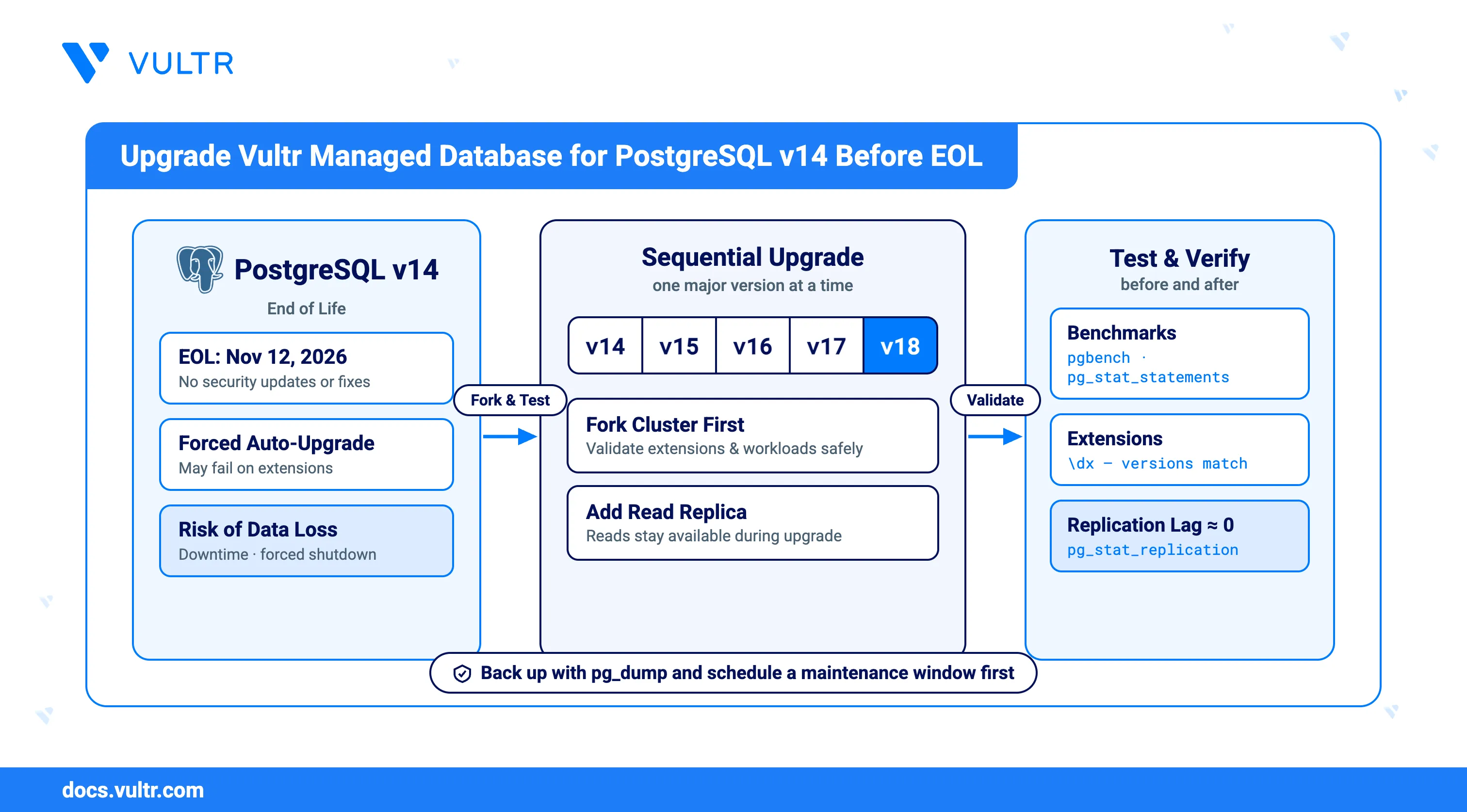
Vultr Managed Databases for PostgreSQL v14 will reach End of Life (EOL) on November 12, 2026, meaning it will no longer receive security updates, bug fixes, or performance improvements. Running an unsupported version leaves your applications at risk and may impact service stability.
To maintain a secure and reliable environment, you should upgrade your Vultr Managed Database for PostgreSQL v14 to a newer, supported version before the EOL date.
If you do not take action:
- You will lose the ability to fork v14 databases for safe upgrade testing.
- The platform will attempt an automatic upgrade, which may fail due to incompatibilities or extension issues.
- Failed automatic upgrades may lead to downtime, forced service shutdown, and in the worst case, permanent data loss.
Follow this guide to safely upgrade your PostgreSQL v14 clusters to the latest supported version, ensuring your databases remain stable, secure, and fully operational.
Prerequisites
Before you begin, ensure you:
- Have access to an existing Vultr Managed Database for PostgreSQL v14.
- Create a backup of all databases using pg_dump.
Fork Your Existing PostgreSQL v14 Cluster
Before starting the upgrade process, you should create a fork of your existing PostgreSQL v14 cluster. Forking creates an independent copy of your database, which allows you to test the upgrade without impacting your production workloads. This step is important because it ensures that the upgrade process can be validated in advance, potential issues with extensions or large datasets can be identified, and your applications can be tested against the new PostgreSQL version under realistic conditions.
Note
Forking is not supported on the Hobbyist (lowest-cost) plan. If your cluster runs on this plan, you must upgrade to a higher plan before you can fork and test your upgrade.
- Log in to the Vultr Console.
- Click Storage in the left sidebar, then click Databases.
- From the list of available databases, locate and select the PostgreSQL v14 database that you want to upgrade.
- Under the Actions section, click Fork Database Cluster.
- In the Choose a state section, select Latest Backup, which typically corresponds to a backup created within the last hour.
- Review the Server Configuration section, which automatically matches the plan of your original cluster. Set the Number of Failover Replica Nodes for the forked cluster if you want failover protection during testing.
- In the Server Location section, select the region where the forked cluster should be deployed, typically the same region as the original cluster.
- If your existing database is connected through a VPC network, make sure to select the same VPC for the forked cluster.
- Provide a descriptive label for the forked cluster, and then click Deploy Now to begin the provisioning process.
Note
Provisioning a forked cluster generally requires more time than deploying a new cluster because the backup restoration process runs in the background. The provisioning time can further increase if you choose a different location than the original database cluster, as the backup must be transferred to the new region before it can be restored.
Upgrade the Forked Cluster
After creating a fork of your PostgreSQL v14 database, the next step is to upgrade the forked cluster. Performing the upgrade on a fork ensures that you can safely validate compatibility, test extensions, and verify application performance before applying changes to the production database.
Note
Do not attempt to upgrade across multiple major versions in a single step. Always upgrade sequentially, moving one major version at a time (for example, v14 → v15 → v16 → v17 → v18). Skipping versions may cause the upgrade to fail or result in data corruption.
Return to the Databases section in the Vultr Console.
Select the forked PostgreSQL v14 cluster you created in the previous step.
Open the Settings tab, then choose Upgrade Version from the left hand menu.
From the Please select the new PostgreSQL version dropdown, select the next major version. For example, upgrade from v14 to v15.
The Vultr Console performs a compatibility check and displays a message confirming that the upgrade is compatible with your current version.
Click Submit to begin the upgrade.
Wait until the primary database node completes the upgrade and becomes accessible. Read replicas in the forked cluster are upgraded automatically, so no manual intervention is required.
Continue upgrading one major version at a time until you reach the latest supported stable release (for example, v18).
Test the Upgraded Cluster
After upgrading the forked cluster to the latest supported PostgreSQL version, it is important to test the cluster before applying changes to your production environment. Testing ensures that your applications remain compatible, performance is acceptable, and any potential issues are discovered early.
Begin by testing under a realistic workload. If possible, connect the upgraded cluster to a staging or development environment that mirrors your production setup. Monitor query execution, latency, and overall application stability.
Use the
pgbenchtool to benchmark performance and compare results with your original PostgreSQL v14 cluster.Connect to the upgraded database using
psql.CONSOLEEnable the
pg_stat_statementsextension to collect query execution statistics.PSQLRun the following query to identify the five slowest queries, which may help detect performance regressions after the upgrade.
PSQLValidate all required extensions are installed as some extensions may change behavior or require upgrades between major PostgreSQL versions.
PSQLEnsure every required extension is installed and at the correct version.
Check replication status if your cluster includes read replicas.
PSQLOutput:
In the above output 2nd row is the replica node replication status:
fda7:a938:5bfe:6a12:...: The IPv6 address of your read replica. This shows which node is connected.streaming: Replication is active. The replica is continuously receiving WAL (write-ahead log) records from the primary.async: The replica is asynchronous. This means the primary doesn't wait for the replica to acknowledge writes before committing transactions. If the primary crashes, the replica might be missing the very latest transactions.write_lag = 00:00:00.001194(~1.2 ms): Time between WAL being generated on the primary and received by the replica. Almost instant.flush_lag = 00:00:00.001462(~1.5 ms): Time it takes for the replica to write that WAL to disk after receiving it.replay_lag = 00:00:00.001621(~1.6 ms): Time it takes for the replica to actually apply (replay) the WAL changes into the database.
Replication is considered healthy when the
write_lag,flush_lag, andreplay_lagvalues are close to zero.Review database logs for warnings or errors that may indicate compatibility issues introduced by the new version.
Upgrade the Primary PostgreSQL Cluster
Upgrading the primary PostgreSQL cluster is the most important stage of the process, as it directly affects production workloads. To safeguard against issues, you should first add a read replica and confirm that replication is healthy. This replica provides an additional layer of protection, helping to reduce the risk of data loss if the primary node experiences problems during the upgrade. The upgrade itself must be performed step by step across major versions, and because the primary node will be unavailable during the operation, it is best scheduled during a maintenance window or a period of low traffic to minimize disruption.
Add a Read Replica
Before beginning the upgrade, it is recommended that you create a read-only replica. Large databases may require significant time to upgrade, during which the primary database will not be accessible. Having a replica ensures that your data remains available for read operations throughout the process. In addition, the replica acts as a safeguard against potential data loss, as it can serve as a fallback if the primary node experiences issues before the upgrade is completed.
Note
If you already have a read-only replica in place, you can skip this section.
Click Storage in the left sidebar, then click Databases.
From the list of available databases, select the primary PostgreSQL cluster that you intend to upgrade.
Under the Actions section, click Add Read-Only Replica Node.
In the Server Location section, select the same region as the primary cluster.
Provide a descriptive label for the replica and click Deploy Now to begin provisioning.
The replica appears nested under the primary cluster in the Databases list with a status of Rebuilding until provisioning completes.
Wait until the read replica becomes available.
After the replica is accessible, connect to the primary database using
psql.CONSOLEVerify that there is no replication lag between the primary and replica node.
PSQLConfirm that replication lag remains near zero.
Upgrade the Primary Cluster
Upgrading the cluster advances the primary database to a newer PostgreSQL version. This operation is performed in place and affects production availability, so it should be scheduled carefully.
Note
During the upgrade, the primary node becomes unavailable. Read replicas remain accessible while the primary is upgrading, but they also undergo the same process later and go offline temporarily after the primary node is back in service.
Important considerations before upgrading:
- The upgrade is applied immediately once started.
- Downgrading to the previous version is not possible.
- Backups created on older PostgreSQL versions cannot be used for PITR. Only backups generated after the upgrade are valid for recovery.
- Expect downtime during the primary node upgrade. Plan this during a maintenance window or a low-traffic period.
- Navigate back to the Databases section.
- Select your primary PostgreSQL cluster.
- Open the Settings tab, then choose Upgrade Version from the left menu.
- Select the next available version. Major version upgrades must be performed sequentially (for example, v14 → v15 → v16 → v17 → v18). Skipping versions may corrupt the cluster.
- When you select a version, the system performs a compatibility check.
- After the compatibility check succeeds, click Submit to begin the upgrade. Any failover replicas are removed at this stage.
- The upgrade duration depends on the size of your data and the workload on the cluster.
- Wait until the primary node becomes accessible after the upgrade.
- After the primary upgrade completes, a new full backup is initiated for the cluster. After this backup is ready, new failover replica nodes are provisioned.
- Read replicas are upgraded automatically after the primary node is available. Ensure all replicas are accessible before proceeding to next upgrade.
- After the upgrade,
ANALYZEis automatically run on all tables to refresh statistics and optimize query performance. No manual action is required. - After the upgrade is completed, validate the upgraded primary cluster using the same tests performed on the forked cluster. This includes benchmarking with
pgbench, checking query performance withpg_stat_statements, verifying required extensions, monitoring replication for read replicas, and reviewing database logs.
Conclusion
You have successfully upgraded your PostgreSQL cluster from v14 to the latest supported version by creating a forked cluster for safe testing, adding and verifying read replicas to minimize risk, and performing sequential major version upgrades. The upgraded cluster has been validated with benchmarks, query analysis, and replication checks to ensure applications, extensions, and queries function as expected.
For a detailed overview of changes, new features, and improvements in each PostgreSQL version, refer to the official PostgreSQL Release Notes.


0 Comments
Be the first to comment and share your perspective with the community.