Semantic Video Frame Search Using OpenAI CLIP and Vector Database
Introduction
Semantic video frame search is an emerging generative task that locates and extracts video frames from a collection of files. Each frame search uses the presence of specific keywords, objects, themes or sentiments to generate results. As a result, you can use Semantic video frame search in data-related tasks such as social media content auditing, brand insights, and policy enforcement on user-generated videos.
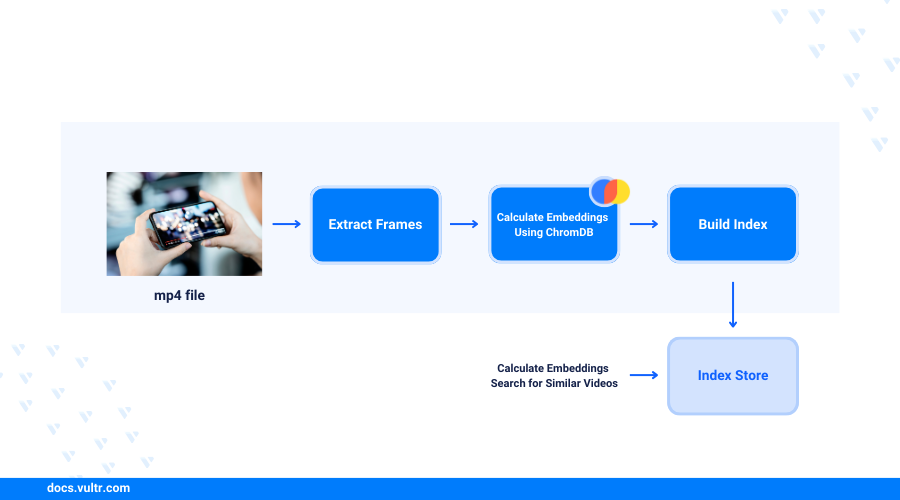
This article explains how to perform semantic video frame search using CLIP on a Vultr Cloud GPU server. You will perform scene detection tasks, image/text embedding using the CLIP model, and apply vector databases to modify the search experiences with better industrial standard results.
Prerequisites
Before you begin:
- Deploy a Ubuntu 22.04 A100 Vultr Cloud GPU server.
- Use SSH to access the server as a non-root user with sudo privileges
- Install JupyterLab.
Set Up the Server
Install all required dependency packages using Pip. These include
scenedetect,opencv-python, andmatplotlib.CONSOLEThe above command installs the following semantic video search dependency packages:
scenedetect: Scans for scene changes and cuts by analyzing a video input.opencv-python: Provides a wide range of image processing functionalities.transformers: Provides APIs and pipelines to download and use pre-trained transformer-based models.chromadb: A vector-based database for building AI applications.ipywidgets: Provides interactive HTML widgets for Jupyter Notebook using the IPython kernel.
Download a sample video to use as the input file. Replace the Google Chromecast video link with your desired file URL and save it as
video.mp4CONSOLECopy the video file to the Jupyter user home directory.
CONSOLE
Get All Representative Frames from Video Scenes
Select Notebook and create a new
Python3Kernel file.Import all required model libraries in a new Notebook code cell.
PYTHONPress Shift + Enter to run the code cell and import all libraries.
Create a new function to fetch the representative frame from a video scene.
PYTHONCreate another function to extract all scenes using a
forloop and the corresponding keyframes from an input video using thePySceneDetectmodule.PYTHONImport your sample video as the input to fetch all representative video frames and store them in memory using a
frameslist that acts as the search space.PYTHONIn this section, you have loaded the sample video, detected available video scenes, and extracted the keyframes from each video scene for representation. Visit the Video Scene Transition Detection and Split Video Using PySceneDetect guide for more information on how to detect scenes. In the additional sections, modify the represented data using the CLIP model and a vector database.
Semantic Video Frame Search using CLIP
In this section, build a basic semantic video frame search system using CLIP. The model inputs a plain text query and returns the most suitable video frame based on the query's semantic meaning.
Load the pre-trained OpenAI CLIP model and processor from the transformers package.
PYTHONWithin the above command:
CLIPModel: Wraps up a vision model to generate visual features and a language model to generate text features.CLIPProcessor: Wraps up the vision and language models including the CLIPFeatureExtractor to encode images for the vision model, and the CLIPTokenizer to encode text for the language model.- The sample code loads the Vision Transformer (ViT) base version with a
32patch size using theViT-B/32Transformer architecture as an image encoder and a masked self-attention Transformer as a text encoder. Visit the Hugging Face CLIP model card for more available pre-trained models you can use.
Ignore any model-loading
TensorRTwarning messages.Define a query prompt in plain text to use with the frame search. For example,
a walking penguin.PYTHONPass the query text and all frames into the CLIP process as the model inputs.
PYTHONPass the processed input to the CLIP model.
PYTHONGet the raw output value, logits, as the unnormalized similarity score between the semantic meaning of the query text, and the visual content from each frame.
PYTHONNormalize the logits among all frame-to-query pairs using the softmax function
PYTHONGet the frame index with the highest normalized similarity score.
PYTHONCheck the searched image result.
PYTHONVerify that your output frame includes a cute walking penguin inside a TV screen cut from the input video.
Bind all frames together to build a function for a one-line semantic frame search.
PYTHONConduct the semantic frame search using your function in a single line, but a different query prompt such as
jumping on the bed.PYTHONVerify another frame with a girl jumping on the bed displays in your output based on the new query prompt.
Speed Up Searching Experience with Vector Database
Speed up the video frame search process with a vector database to verify the performance limitations of the base semantic frame search function. Integrate a vector database into the system to bring its performance to the industrial standards as described in the steps below.
View the required running time for returning the frame result.
PYTHONOutput:
Based on the above output, the running time is
6.38 secondswhere the exact number may vary between5 secondsand8 secondsfor different rounds. This is a long duration for a large-scale semantic image search system that supports millions of video frames in the search space with hundreds of query requests in a single session.A practical industrial system generally requires a running time of less than
100 msfor every single request. As a result, a vector database solves related time challenges by storing and indexing representations in the search space.Load the ChromaDB vector database client package.
PYTHONCreate a new ChromaDB collection to store your frame embeddings and corresponding IDs.
PYTHONDefine a new function to get image embeddings using the CLIP model.
PYTHONGet the image embeddings and IDs for all the extracted video frames.
PYTHONStore the image embeddings and IDs in the ChromaDB collection.
PYTHONDefine a new function to get the query text embeddings in a similar way using the CLIP model and the CLIP processor.
PYTHONQuery ChromaDB to get the semantic frame search result.
PYTHONVerify that the same frame with a girl jumping on the bed displays in your session based on a similar
jumping on the bedprompt. However, with a different running time as compared to the first result.Based on the new result time of
31.2ms, the frame search process improves by100xtimes as the running time meets the recommended industrial standards. However, due to the randomness of the ANN (Approximate Nearest Neighbors) algorithm, the ChromaDB result may not be consistent.
Similar Code Use Cases
In addition to the semantic video frame search, the code implementation in this article is also useful in other similar use cases such as the following.
Objectionable video frame detection: Verifies if newly uploaded videos contain objectionable frames that are not suitable for some audience groups. For example, adult content is not allowed for infant audiences. You can create policy descriptions or keywords as the text query and use the search pipeline to verify the distance to the most similar video frames.Keyframe searching for embedded advertisements: Locates the frames where items appearing in a video can be recommended to audiences for online purchases or advertising. For example, a specific dress in a video could be a top-selling item. As a result, you can identify the specific product keyframes in the video using the semantic frame searching system.
Conclusion
You have set up a semantic video frame search system using the OpenAI CLIP model and a vector database on a Vultr Cloud GPU server. You identified target video frames and performed scene extraction. Then, used the CLIP model and processor to build a basic frame search system and test the performance limitation as compared to a vector database. Download the Jupyter Notebook file to verify the model operations in this article.


0 Comments
Be the first to comment and share your perspective with the community.