How to Configure Smart Routing in NVIDIA Dynamo
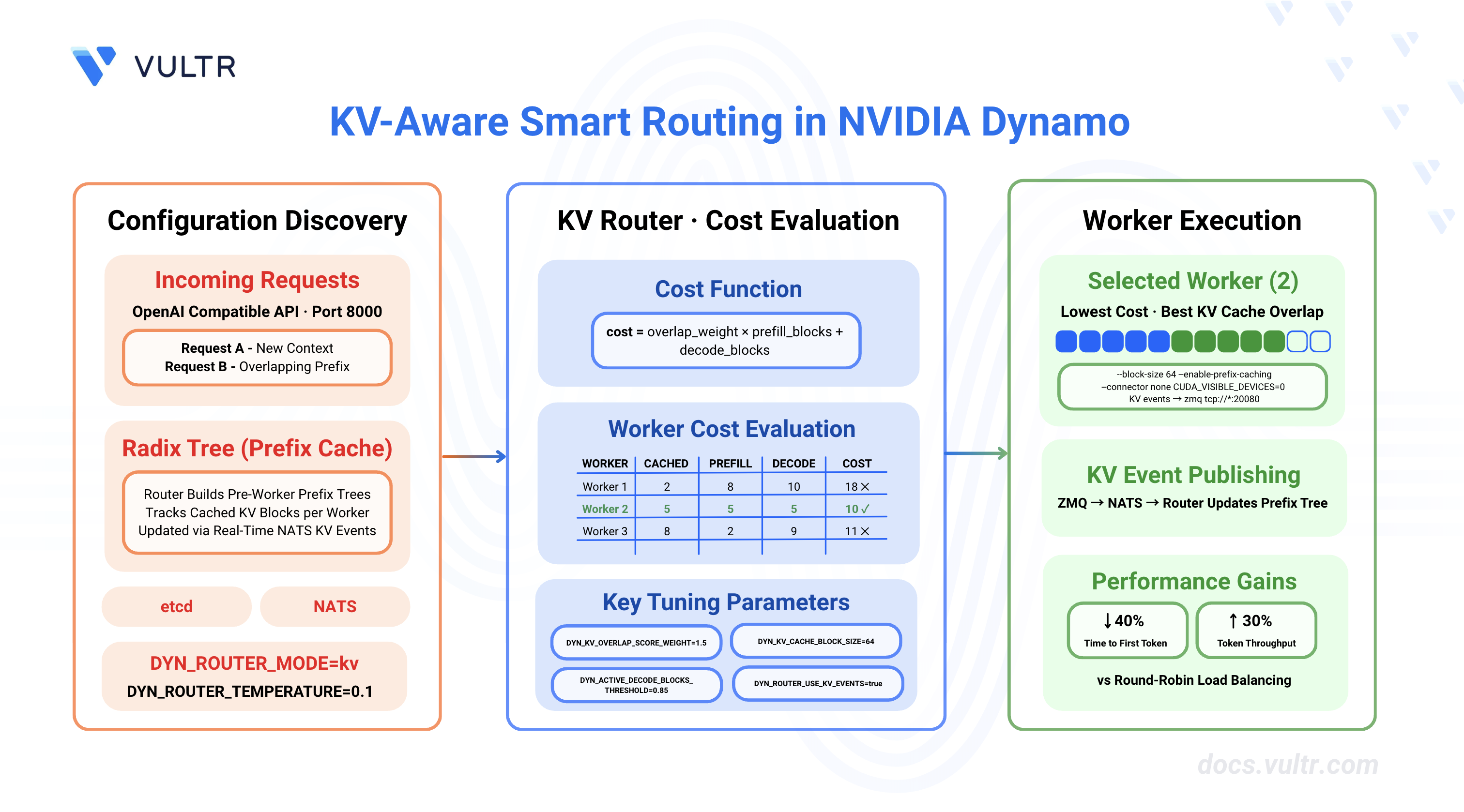
NVIDIA Dynamo is an open-source, high-throughput, low-latency inference framework designed to deploy large-scale generative AI and reasoning models across multi-node, multi-GPU environments. The platform's KV Router intelligently directs inference requests by evaluating computational costs across workers, considering both prefill and decode phases. By maximizing KV cache reuse and minimizing redundant computation, smart routing reduces time-to-first-token (TTFT) by up to 40% and increases overall throughput by 25-30% compared to round-robin load balancing.
This guide outlines the configuration of KV-aware smart routing in NVIDIA Dynamo for distributed inference deployments. It covers infrastructure setup, router enablement for both aggregated and disaggregated serving patterns, parameter tuning for optimal performance, and monitoring techniques for production deployments.
Prerequisites
Before you begin, ensure you:
- Have access to a Linux server with NVIDIA GPUs installed and the NVIDIA Container Toolkit configured. Use a non-root user with sudo privileges.
- 2 GPUs for aggregated serving with smart routing.
- 4 GPUs for disaggregated serving with smart routing.
- Install Docker Engine and Docker Compose.
- Create a Hugging Face account and generate an access token for gated models like Llama.
- Understand basic LLM inference concepts (prefill vs decode phases, KV cache).
Understanding KV-Aware Routing
Traditional load balancing strategies like round-robin or random routing distribute requests evenly across workers without considering their cached state. KV-aware routing optimizes performance by directing requests to workers that already have relevant KV cache blocks, reducing redundant computation during the prefill phase.
How KV Cache Routing Works
The KV Router makes routing decisions based on a cost function that balances two factors:
1. Prefill Cost
The router calculates prefill cost by determining how many tokens need processing from scratch. When a worker has cached KV blocks matching the request's input prefix, those blocks can be reused, reducing prefill computation.
2. Decode Cost
The router tracks active blocks on each worker to estimate decode capacity. Workers with fewer active sequences have more capacity for new requests.
3. Combined Cost Formula
Where:
overlap_score_weightbalances TTFT optimization (higher values) vs load distribution (lower values).- Lower cost indicates a better routing choice.
- Default
overlap_score_weightis 1.0.
Worker Selection Process
The router evaluates all available workers and selects the one with the lowest cost. Consider this example with 3 workers and overlap_score_weight = 1.0:
Worker 2 provides the best balance of cache reuse and available capacity, minimizing both prefill computation and decode load.
Performance Benefits
KV-aware routing provides measurable improvements over basic load balancing:
- TTFT Reduction: 30-40% lower time-to-first-token by maximizing cache hits.
- Throughput Increase: 25-30% higher tokens/second by reducing redundant prefill computation.
- Better GPU Utilization: More balanced load distribution across workers.
- Cache Efficiency: Higher cache hit rates through intelligent request placement.
These benefits are most significant for workloads with:
- Long input prompts (>2000 tokens) where prefill cost dominates.
- Similar or repetitive input prefixes across requests.
- Multiple inference workers with independent KV caches.
Clone the Dynamo Repository
NVIDIA Dynamo provides deployment scripts, launch utilities, and runtime modules for inference workloads. Clone the repository to access deployment examples and container runtime scripts.
Clone the repository.
CONSOLENavigate to the repository directory.
CONSOLESwitch to the latest stable release.
CONSOLEVisit the Dynamo releases page to find the latest stable version.
Verify CUDA Version and Pull Container Image
The vLLM container requires a CUDA version match between the host driver and container runtime to prevent GPU kernel incompatibilities. The NVIDIA Container Toolkit maps host GPUs into containers, requiring the container's CUDA version to align with the host driver's supported version.
Check the installed CUDA version.
CONSOLEThe output displays the CUDA version in the top-right corner of the table.
Pull the vLLM container image from NGC. Match the CUDA version in the image tag to your system's CUDA version.
For CUDA 13.x, use:
CONSOLEFor CUDA 12.x, use:
CONSOLE
Note
Visit the NVIDIA NGC Catalog to view all available image tags and CUDA versions.
(Optional) Build the container from source instead of pulling the pre-built image.
CONSOLEThe build process creates an image named
dynamo:latest-vllm. If you prefer using this locally built image, replacenvcr.io/nvidia/ai-dynamo/vllm-runtime:0.9.0-cuda13withdynamo:latest-vllmin all subsequent commands.
Configure Hugging Face Cache Permissions
The container runs as UID 1000 and requires write access to the Hugging Face cache directory for model downloads. Incorrect permissions prevent the container from accessing cached model weights, causing worker initialization failures.
Create the cache directory if it does not exist.
CONSOLESet ownership to the container user (UID 1000).
CONSOLESet appropriate permissions.
CONSOLE
Start Infrastructure Services
Dynamo's KV Router requires etcd for worker discovery and NATS for KV cache event propagation. The etcd service maintains a registry of active workers and their capabilities, while NATS handles real-time KV block events (creation and eviction) that enable the router to track cached state across workers.
Start the infrastructure services using Docker Compose.
CONSOLEVerify the services are running.
CONSOLEThe output displays the running etcd and NATS containers.
KV Router Configuration Parameters
The KV Router uses environment variables to control routing behavior, cache tracking, and worker selection logic. These parameters determine how the router balances Time To First Token (TTFT) optimization through cache reuse against Inter-Token Latency (ITL) through load distribution. All parameters can be set via environment variables or command-line arguments on the Dynamo frontend.
Core Router Parameters
Worker Capacity Thresholds
These parameters define when a worker is considered "busy" and should be excluded from routing decisions.
Infrastructure Configuration
Parameter Tuning Guidelines
For TTFT Optimization (Low Latency):
- Increase
DYN_KV_OVERLAP_SCORE_WEIGHTto 1.5-2.0 (prioritize cache hits). - Lower busy thresholds:
DYN_ACTIVE_DECODE_BLOCKS_THRESHOLD=0.70,DYN_ACTIVE_PREFILL_TOKENS_THRESHOLD=500. - Keep
DYN_ROUTER_TEMPERATURElow (0.0-0.1) for deterministic selection.
For Throughput Optimization (High Load):
- Lower
DYN_KV_OVERLAP_SCORE_WEIGHTto 0.5-1.0 (balance cache hits with load). - Higher busy thresholds:
DYN_ACTIVE_DECODE_BLOCKS_THRESHOLD=0.95,DYN_ACTIVE_PREFILL_TOKENS_THRESHOLD=2000. - Increase
DYN_ROUTER_TEMPERATUREto 0.3-0.5 for better load distribution.
When KV Events Are Unavailable:
- Set
DYN_KV_EVENTS=falseto use prediction-based routing. - Router tracks state via routing decisions with TTL-based expiration (default 120s).
- Less accurate than real-time events but works without backend KV event support.
Set Up Deployment Environment
Both aggregated and disaggregated serving deployments use the same KV routing configuration. This section prepares the container environment and creates a shared configuration file for all deployment scripts.
Export your Hugging Face token. Replace
YOUR_HF_TOKENwith your actual token.CONSOLERun the vLLM container with GPU access and workspace mounting. Use the image tag that matches your CUDA version.
CONSOLEThe command starts an interactive container session with GPU support and passes the Hugging Face token to the container.
Inside the container, create the common environment configuration file.
CONSOLEThe common environment file contains shared configuration variables for all deployment scripts, including etcd endpoints, NATS server address, and KV routing parameters.
Configure KV Routing for Aggregated Serving
Aggregated serving combines prefill and decode phases on a single worker. KV-aware routing optimizes which worker receives each request based on cached KV blocks, improving performance even when workers handle both phases. The deployment script configures multiple vLLM workers with KV event publishing and a frontend with KV-aware routing enabled.
Deploy Aggregated Serving with KV Routing
The deployment script launches multiple vLLM workers with KV event publishing enabled and a frontend configured for KV-aware routing. The script automatically handles process cleanup and provides routing configuration feedback.
Inside the container, create the aggregated serving deployment script.
CONSOLEThis script configures aggregated serving with KV-aware routing:
- Accepts the model name as a command-line argument (defaults to NVIDIA Nemotron Nano 4B).
- Sources the environment configuration created earlier (includes
DYN_EVENT_PLANE=nats). - Uses
--connector nonefor aggregated serving (prefill+decode on same worker). - Uses
--enforce-eagerfor fast deployment without compilation. - Enables prefix caching with
--enable-prefix-cachingfor KV cache reuse. - Enables KV event publishing with ZMQ endpoints (ports 5557, 5558) on both workers.
- Configures system ports with
DYN_SYSTEM_PORTto avoid conflicts (8081, 8082). - Uses
--trust-remote-codeto support NVIDIA Nemotron models.
Note
KV Event Flow Architecture: vLLM natively publishes KV cache events via ZMQ. Dynamo's bridge component automatically translates these events to NATS for router consumption:
This architecture provides the router with a unified view of cache state across all workers while allowing vLLM to use its native ZMQ event publishing. You'll see ZMQ endpoints in worker logs, but events flow through the Dynamo bridge to NATS for router consumption.
Make the script executable.
CONSOLERun the aggregated serving script.
CONSOLEThe script starts the frontend with KV routing enabled and launches two vLLM workers on GPUs 0 and 1. The frontend connects to NATS and begins consuming KV events from all registered workers. The router builds a prefix tree (radix tree) to track cached blocks across workers.
To deploy a different model, pass the model name as an argument:
CONSOLE
Verify KV Routing
The router logs provide insights into worker selection and cost calculations. Verify that the router makes KV-aware decisions based on cached blocks.
Open a new terminal session and send a test request to the frontend. Replace the model name if you deployed with a different model.
CONSOLEThe output displays the model's response in JSON format with streaming tokens.
Check the frontend logs for routing decision details. The logs display cost calculations showing the router's cost formula for each worker:
The router calculates the cost for each worker using the formula:
cost = overlap_weight × prefill_blocks + decode_blocks. In this example, both workers have 0 cached blocks (cold start), equal prefill costs (2.125 blocks weighted by 1.5), and equal decode loads (2.000). With identical costs (5.188), the router selects a worker based on temperature sampling. The worker with the lowest cost is selected for the request.Send a second request with a similar prompt prefix.
CONSOLECheck the routing decision for the second request in the logs. If the router detects cached blocks from the previous request with a matching prompt prefix, the logs will show a reduced prefill cost:
The router prioritizes worker 7587893399646425892 with 1 cached block, reducing its cost from 5.375 to 3.875. The cached block reduces the prefill computation needed (1.250 blocks vs 2.250), demonstrating KV cache reuse resulting in faster Time To First Token (TTFT) for requests with overlapping prompt prefixes.
Open a new terminal session on the host (outside the container) and monitor the KV event stream to verify event publishing.
CONSOLEThe output displays the JetStream statistics including message count and consumer information.
The message count increases as workers publish KV cache events. Each message represents a KV cache state change, such as block creation or eviction.
Configure KV Routing for Disaggregated Serving
Disaggregated serving separates prefill and decode phases across different worker pools. The KV Router optimizes both prefill worker selection (based on cache hits) and decode worker assignment (based on load distribution), while coordinating KV cache transfer between phases via NIXL. The deployment script launches dedicated prefill and decode workers with appropriate batch sizes and KV event publishing enabled.
Deploy Disaggregated Serving with KV Routing
The deployment script configures the frontend with increased overlap weight for prefill optimization, launches prefill workers with low batch sizes for TTFT optimization, and decode workers with high batch sizes for throughput maximization. NIXL connector enables efficient KV cache transfer between prefill and decode workers.
If the aggregated serving script is still running from the previous section, stop it by pressing
Ctrl+Cin the container terminal.Inside the same container, create the disaggregated serving deployment script.
CONSOLEThis script configures disaggregated serving with KV-aware routing and NIXL for KV cache transfer:
- Accepts the model name as a command-line argument (defaults to NVIDIA Nemotron Nano 4B).
- Sources the environment configuration created earlier (includes
DYN_EVENT_PLANE=nats). - Uses
--connector nixlto enable NIXL for KV cache transfer between prefill and decode workers. - Sets unique NIXL ports via
VLLM_NIXL_SIDE_CHANNEL_PORTfor workers 2 and 4 (20097, 20099). - Enables prefix caching on all workers with
--enable-prefix-cachingfor KV cache reuse. - Configures decode workers on GPUs 0-1 to receive KV cache from prefill workers via NIXL.
- Configures prefill workers on GPUs 2-3 with ZMQ endpoints (ports 5559, 5560) for KV event publishing.
- Uses
--trust-remote-codeto support NVIDIA Nemotron models. - Uses
--max-model-len 2048for efficient memory usage across all workers. - Frontend automatically detects prefill and decode workers to enable disaggregated routing.
Make the script executable.
CONSOLERun the disaggregated serving script.
CONSOLEThe script starts the frontend, two decode workers on GPUs 0-1, and two prefill workers on GPUs 2-3. The frontend automatically detects prefill workers and creates an internal prefill router for cache-aware prefill worker selection. The main router handles decode worker assignment based on load distribution.
To deploy a different model, pass the model name as an argument:
CONSOLE
Verify Disaggregated KV Routing
Disaggregated routing involves two routing decisions: prefill worker selection based on cache overlap, and decode worker assignment based on load and available capacity. The script output shows both routing stages.
Open a new terminal session and send a test request to verify the disaggregated flow. Replace the model name if you deployed with a different model.
CONSOLECheck the frontend logs for prefill routing decisions in the script output. The logs show prefill worker cost calculations with the higher overlap weight (1.5):
The prefill router evaluates both prefill workers. On the first request (cold start), both workers have 0 cached blocks, resulting in equal costs (4.125). The cost formula applies the overlap weight of 1.5 to the prefill blocks (2.750), resulting in
4.125 = 1.5 * 2.750 + 0.000. The decode blocks component is 0.0 because prefill workers only handle the prefill phase.Check the decode routing decisions in the script output. After prefill completion, the decode router assigns the request to a decode worker:
The decode router selects a decode worker based on load. The prefill blocks component is 0.0 in the formula because decode workers don't compute prefills—they receive KV cache from prefill workers via NIXL transfer.
Monitor NIXL transfer success in the worker logs displayed by the script. The logs confirm KV cache transfer:
NIXL successfully transfers KV cache blocks from prefill to decode workers using RDMA for low-latency, high-bandwidth data transfer.
Send a second request with a similar prompt prefix to verify cache reuse.
CONSOLECheck the prefill routing logs for the second request. The logs show improved cache hits:
The prefill router now sees 1 cached block on worker 7587893399646425930, reducing its cost from 3.750 to 2.250. The router prioritizes this worker due to the lower cost from cache reuse, demonstrating KV-aware routing's ability to optimize TTFT by leveraging cached prompt prefixes.
Configure KV Routing with SGLang and TensorRT-LLM
The KV Router environment configuration is universal across all inference backends. The same environment variables used for vLLM deployments work identically with SGLang and TensorRT-LLM, requiring only backend-specific adjustments for block size and KV event publishing.
For complete deployment guides using these backends, see:
Universal Environment Variables
These environment variables work across all backends (vLLM, SGLang, TensorRT-LLM) without modification:
CONSOLE
Backend-Specific Configuration
While the router environment variables are universal, two aspects require backend-specific configuration:
Block Size Configuration
The DYN_KV_CACHE_BLOCK_SIZE must match your backend's actual block size configuration:
Important
Mismatched block sizes between the router and workers cause incorrect cost calculations and routing decisions. Always verify your backend's block size configuration.
KV Event Publishing Configuration
Each backend uses different command-line parameters to enable KV event publishing to the router:
SGLang publishes events using a NATS URL format:
TensorRT-LLM uses a simple flag to enable event publishing:
vLLM uses a JSON configuration format with ZMQ endpoint specification:
Use the backend-specific deployment guides linked at the beginning of this section along with these parameters to enable KV-aware routing for SGLang or TensorRT-LLM deployments.
Tuning KV Router Parameters
The KV Router provides several parameters to optimize routing behavior for different workload characteristics. Proper tuning balances cache reuse (TTFT optimization) with load distribution (ITL optimization).
Overlap Score Weight
The --kv-overlap-score-weight parameter controls the router's preference for cache hits versus load balancing.
Default Value: 1.0
When to Adjust:
Increase (1.5-2.0) for prefill-heavy workloads:
- Long input prompts (>2000 tokens)
- Short output generation (<200 tokens)
- Minimizing TTFT is critical
CONSOLEDecrease (0.5-0.8) for decode-heavy workloads:
- Short input prompts (<500 tokens)
- Long output generation (>1000 tokens)
- Maximizing throughput is critical
CONSOLESet to 0.0 to disable cache-aware routing and use pure load balancing:
CONSOLEThis mode ignores cached blocks and routes based solely on worker load. Useful for workloads with no prefix overlap or for baseline performance comparisons.
Router Temperature
The --router-temperature parameter introduces randomness in worker selection to prevent saturation and improve load distribution.
Default Value: 0.0 (deterministic)
When to Adjust:
Temperature = 0.0 (default): Always select the lowest-cost worker.
- Best for: Maximizing cache reuse, stable workloads.
- Risk: May oversaturate workers with the best cache state.
Temperature = 0.2-0.5: Add slight randomness while still favoring low-cost workers.
- Best for: Production workloads with variable request patterns.
- Benefit: Better load distribution without sacrificing much cache efficiency.
CONSOLETemperature = 1.0+: More uniform distribution across workers.
- Best for: Debugging, testing, or when cache reuse is less important.
- Behavior: Approaches random selection at very high temperatures.
KV Events Configuration
The --no-kv-events flag disables real-time KV event tracking and switches to prediction-based routing.
Default: KV events enabled
Prediction-Based Routing (--no-kv-events):
When enabled, the router predicts cache state based on its own routing decisions instead of receiving events from workers.
CONSOLE
Additional Parameters for Prediction Mode:
--router-ttl 120: Expire cached blocks after 120 seconds (default: 120).--router-max-tree-size 1048576: Maximum blocks before pruning (default: 2^20).--router-prune-target-ratio 0.8: Prune to 80% of max size when threshold exceeded.
When to Use:
- Backend doesn't support KV event publishing.
- Lower infrastructure overhead (no NATS dependency).
- Simple deployments where prediction accuracy is acceptable.
Backend Configuration for Prediction Mode:
When using --no-kv-events, configure backends to disable event publishing:
- vLLM: Use
--kv-events-config '{"enable_kv_cache_events": false}'. - SGLang: Do not use
--kv-events-config. - TRT-LLM: Do not use
--publish-events-and-metrics.
Active Block Busy Detection
The --active-decode-blocks-threshold parameter marks workers as busy when their KV cache utilization exceeds a threshold, preventing overload.
Default: Disabled (no threshold)
Configuration:
CONSOLE
Parameters:
--active-decode-blocks-threshold 0.85: Mark worker busy at 85% KV cache utilization.--active-prefill-tokens-threshold 10000: Mark worker busy when prefill tokens exceed 10,000.
When Workers Are Busy:
Busy workers are excluded from routing decisions until their load drops below the threshold. This prevents request queueing and maintains consistent latency.
Dynamic Threshold Updates:
Thresholds can be updated at runtime without restarting the frontend:
CONSOLE
The response confirms the updated thresholds:
Router Replica Synchronization
The --router-replica-sync flag enables active block state synchronization between multiple router replicas for consistent load balancing.
Default: Disabled
When to Enable:
Launch multiple frontend replicas for fault tolerance and horizontal scaling:
CONSOLE
How It Works:
- Each replica maintains its own view of active blocks (ephemeral state).
- Replicas exchange routing decisions via NATS core messaging.
- Cached block state (persistent) syncs automatically via JetStream.
- New replicas start with zero active blocks but converge quickly through sync.
Benefits:
- Consistent routing decisions across replicas.
- Better load distribution in multi-replica deployments.
- Faster convergence for new replicas.
Monitor KV Router Performance
To monitor KV Router performance metrics including routing decisions, cache efficiency, and worker utilization, deploy the observability stack following the How to Enable Observability in NVIDIA Dynamo Inference Pipelines guide.
Add the KV Router environment variables from this guide to your deployment configuration, then use Grafana dashboards to visualize KV cache routing performance metrics and Prometheus to track TTFT improvements, cache hit rates, and worker selection patterns.
Conclusion
You have successfully configured KV-aware smart routing in NVIDIA Dynamo for distributed LLM inference. The KV Router optimizes worker selection by considering cached block overlap and worker load, achieving significant improvements in TTFT (30-40% reduction) and throughput (25-30% increase) compared to basic load balancing strategies. You configured routing for both aggregated and disaggregated serving patterns, tuned parameters based on workload characteristics, and implemented monitoring for production deployments. For advanced deployment patterns including multi-region routing and custom routing logic, refer to the official NVIDIA Dynamo Router documentation.


0 Comments
Be the first to comment and share your perspective with the community.