How to Deploy OpenBao - An Open-Source Secrets Management Platform
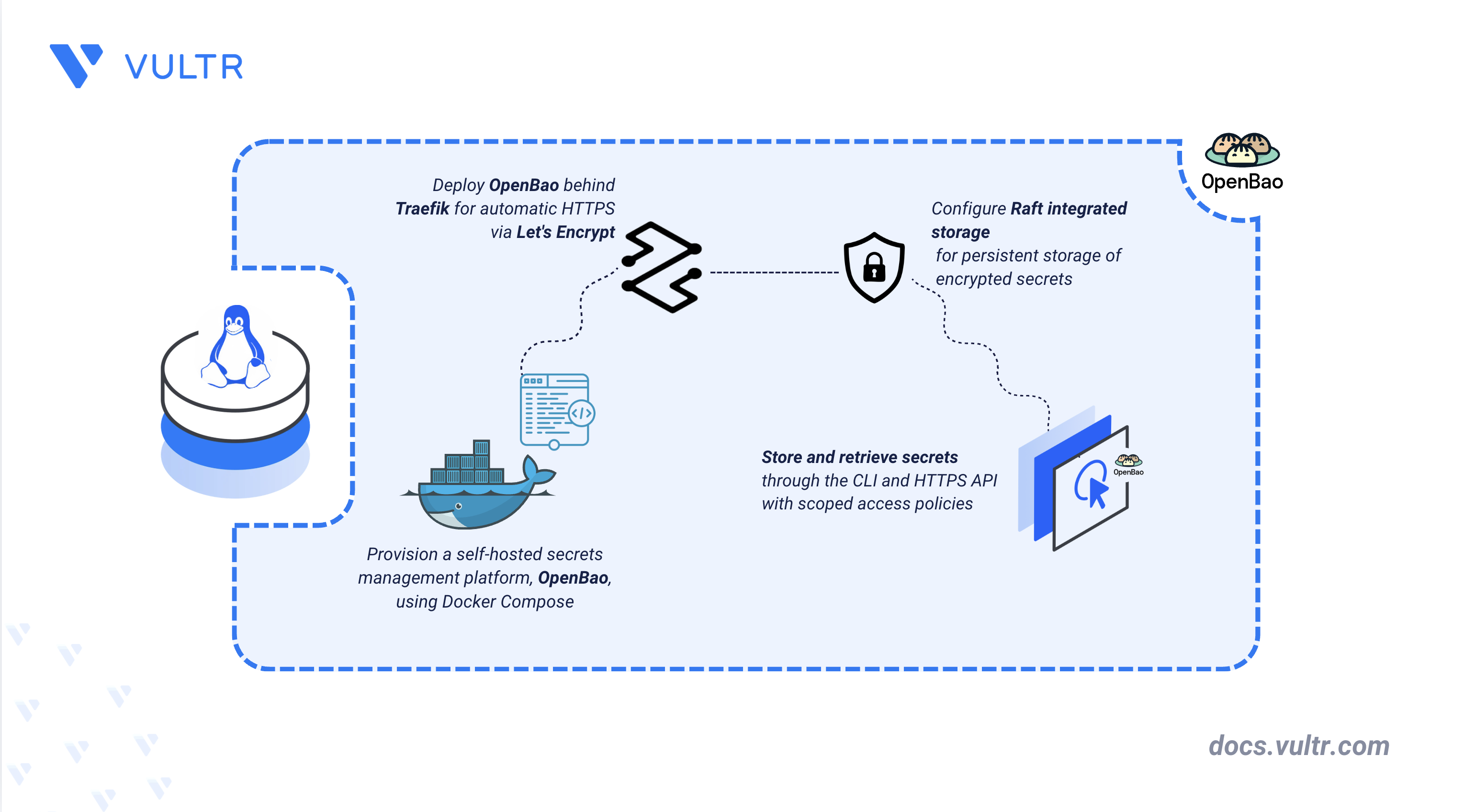
OpenBao is an open-source secrets management platform that stores, generates, and controls access to credentials, certificates, and encryption keys. It began as a community fork of HashiCorp Vault and is governed by the Linux Foundation under the Mozilla Public License 2.0 (MPL-2.0). OpenBao exposes an HTTP API, a CLI, and a web interface that share the same authentication model, so applications and operators consume secrets through a single audited endpoint instead of storing plaintext credentials in configuration files.
This article explains how to install OpenBao with Docker Compose on a Linux-based server. It covers the server configuration for the Raft integrated storage backend, deployment behind a Traefik reverse proxy with automatic TLS certificates, initialization and unsealing, configuration of the key-value version 2 secrets engine with an access control policy and a user account, and secret storage and retrieval through the CLI and the HTTP API of the self-hosted deployment.
Prerequisites
Before you begin, ensure you:
- Have access to a Linux-based server (with at least 2 CPU cores and 4 GB of RAM) as a non-root user with sudo privileges.
- Install Docker and Docker Compose.
- Create a DNS A record pointing to your server's IP address (for example,
bao.example.com).
Set Up the Directory Structure, Configuration, and Environment Variables
OpenBao reads its runtime settings from a HashiCorp Configuration Language (HCL) file that declares the network listener, the storage backend, and the cluster addresses. The Raft integrated storage backend writes encrypted data to a local directory, which removes the need for an external database.
Create the project directory along with a configuration subdirectory.
CONSOLESwitch to the project directory.
CONSOLECreate the OpenBao server configuration file.
CONSOLEAdd the following Raft storage configuration. Replace
bao.example.comwith your domain name.HCLSave and close the file.
The above configuration declares the following settings:
ui: Enables the built-in web interface at the/uipath.storage "raft": Selects the integrated storage backend. Thepathvalue matches the data directory inside the container, andnode_ididentifies the node within the Raft cluster.listener "tcp": Binds the API to all container interfaces on port8200. TLS terminates at Traefik, so the listener serves plain HTTP on the private Docker network and is never published to the host.audit "file": Declares a file audit device that records every request and response to the mounted logs volume. Declaring the device in the configuration file activates auditing from the first boot.api_addr: The external URL that OpenBao advertises to clients for request redirection.cluster_addr: The internal address used for server-to-server communication on port8201.
Create the environment file.
CONSOLEAdd the following variables. Replace
bao.example.comwith the domain that resolves to your server, andADMIN_EMAILwith a deliverable address on a domain you control, because Let's Encrypt rejects addresses on reserved domains such asexample.com.INISave and close the file.
Deploy with Docker Compose
The deployment runs two containers on a shared bridge network. Traefik accepts external traffic on ports 80 and 443, requests a Let's Encrypt certificate through the TLS-ALPN challenge, and forwards decrypted requests to the OpenBao container on port 8200. Named volumes preserve the Raft database and audit logs across container replacements.
Create the Compose file.
CONSOLEAdd the following configuration:
YAMLSave and close the file.
In this configuration:
command: Overrides the image default, which starts a throwaway development server, and launches a production server instead. The entrypoint loads every configuration file in/openbao/config.BAO_ADDR: Points the CLI inside the container at the local listener, so administrative commands run without an address flag../config:/openbao/config:ro: Mounts the configuration directory read-only.openbao-data: Stores the Raft database that holds every encrypted secret. Deleting this volume destroys the deployment data.labels: Registers the container with Traefik, matches requests for the configured host, and enables certificate issuance through theletsencryptresolver.exposedbydefault=false: Routes only containers that explicitly settraefik.enable=true.
Start the stack in detached mode.
CONSOLEVerify that both containers are running.
CONSOLEThe output displays two running containers with Traefik listening on ports 80 and 443.
Inspect the OpenBao logs to verify that the server started.
CONSOLEThe output displays a configuration summary followed by a message confirming that the server started. The log may begin with
chown: /openbao/config: Read-only file systemwarnings. These warnings are expected because the configuration directory is mounted read-only, and they do not affect the server.Verify that Traefik issued a certificate and routes traffic to OpenBao. Replace
bao.example.comwith your domain name.CONSOLEThe response returns an HTTP
501status, which OpenBao uses to report an uninitialized server, andcurlraises no certificate error. Certificate issuance takes up to a minute after the containers start. A certificate error or a connection timeout indicates that the domain does not resolve to the server or that inbound traffic on ports80and443is blocked.
Access and Configure OpenBao
A newly deployed server is both uninitialized and sealed. Initialization generates the root encryption key, splits it into Shamir key shares, and returns the initial root token. The server decrypts its storage only after an operator supplies a threshold number of shares.
Initialize the server with three key shares and an unseal threshold of two.
CONSOLEThe output resembles the following:
OpenBao inherits several user-facing strings from its Vault origin, so the message refers to Vault.
Warning
- Store the unseal keys and the root token in separate secure locations outside the server. OpenBao does not store them, and losing a threshold number of shares permanently locks the encrypted data.
- Distribute individual key shares to different operators so that no single person can unseal the server alone.
Supply the first unseal key. Replace
UNSEAL_KEY_1with the first key from the initialization output.CONSOLEThe output reports
Sealedastrueand an unseal progress of1/2.Supply the second unseal key. Replace
UNSEAL_KEY_2with the second key.CONSOLEThe output reports
Sealedasfalse, which confirms that the server is ready to serve requests. TheHA Modefield readsstandbyfor a few seconds while the node completes leader election, then readsactive.The server starts sealed after every container restart. Production deployments avoid this manual unseal with an auto-unseal seal stanza backed by a cloud Key Management Service (KMS) or a second OpenBao instance running the Transit engine.
Authenticate with the initial root token. Replace
ROOT_TOKENwith the token from the initialization output.CONSOLEThe output confirms that the token is stored and lists its attached policies,
rootamong them.Enable the key-value version 2 secrets engine at the
kvpath.CONSOLEThe output confirms that the engine is enabled at
kv/. Version 2 retains a configurable history of every secret, which allows rollbacks and soft deletion.Verify that the audit device declared in the configuration file is active.
CONSOLEThe output lists the
app-audit/device with typefile. OpenBao writes one structured JSON entry per request and response, with sensitive values replaced by HMAC digests.Create an access control policy file in the project directory.
CONSOLEAdd the following policy:
HCLSave and close the file.
The policy grants access only to secrets under the
app/prefix. Thekv/data/path controls the secret values, whilekv/metadata/controls version history and deletion metadata. OpenBao denies every path that a policy does not explicitly allow.Write the policy to the server.
CONSOLEThe
-argument reads the policy from standard input, which keeps the file out of the mounted configuration directory. The output confirms that OpenBao uploaded theapp-policypolicy.Enable the userpass authentication method.
CONSOLEThe output confirms
Success! Enabled userpass auth method at: userpass/. Accounts under this method authenticate with a username and password and receive a token scoped to the attached policies.Create a user account bound to the policy. Replace
STRONG_PASSWORDwith a strong password.CONSOLETokens issued to this account inherit
app-policyand cannot read secrets outside theapp/prefix. Each token expires after the default lease duration of 768 hours.Open
https://bao.example.comin a web browser, replacingbao.example.comwith your domain name. Select Username as the authentication method, then enterappuserand the password to sign in.The interface displays the secrets engines that the token can access.
Manage Secrets Through the CLI and API
A complete secret lifecycle spans an operator write through the CLI and an application read over the HTTPS API with a token scoped to the appuser account.
Store a Secret via CLI
The bao kv command group writes and reads structured secrets. Each write creates a new version rather than overwriting the previous value.
Write a database credential to the
app/databasepath. ReplaceDB_PASSWORDwith the actual database password.CONSOLEThe output confirms the write and reports
version 1.Read the secret back.
CONSOLEThe output resembles the following:
Update the password to create a second version. Replace
NEW_DB_PASSWORDwith the rotated password.CONSOLEThe output reports
version 2, and clients that read the secret without a version parameter now receive the updated value.Retrieve the earlier version to verify that the history is intact.
CONSOLEThe output displays the original password along with
version 1in the metadata.
Retrieve the Secret via API
The HTTP API exposes the same operations through Traefik over HTTPS. A client exchanges its credentials for a short-lived client token, then sends that token in the X-Vault-Token header, a name OpenBao retains for compatibility with existing Vault client libraries.
Authenticate as
appuserto request a client token. ReplaceSTRONG_PASSWORDwith the account password, andbao.example.comwith your domain name.CONSOLEThe response contains an
authobject with aclient_tokenfield, apoliciesarray listingapp-policyanddefault, and alease_durationof2764800seconds.Export the returned token as a shell variable. Replace
CLIENT_TOKENwith theclient_tokenvalue from the previous response.CONSOLERead the database credential through the API. Replace
bao.example.comwith your domain name.CONSOLEThe response nests the secret under
data.dataand the version details underdata.metadata, which reflects the two-layer structure of the version 2 engine.Write a new secret through the API. Replace
YOUR_APP_API_KEYwith the key your application uses, andbao.example.comwith your domain name.CONSOLEThe response returns the created version number and its metadata.
Verify that a request outside the permitted prefix fails. Replace
bao.example.comwith your domain name.CONSOLEThe response returns an HTTP
403status with the body{"errors":["1 error occurred:\n\t* permission denied\n\n"]}, which confirms thatapp-policyrestricts the token to theapp/prefix.
Conclusion
You have deployed OpenBao on a Linux-based server with Docker Compose, secured the endpoint with automatic TLS certificates through Traefik, initialized and unsealed the server backed by Raft integrated storage, and configured the key-value secrets engine with a least-privilege policy and a dedicated user account. Applications now read credentials through the CLI or the HTTP API with scoped tokens, and the file audit device records every request. To extend the deployment, enable additional secrets engines such as PKI for certificate issuance, Transit for encryption as a service, or the database engine for dynamic, short-lived credentials. For more information, visit the official OpenBao documentation.

0 Comments
Be the first to comment and share your perspective with the community.