How to Build Disaggregated Inference with NVIDIA Dynamo
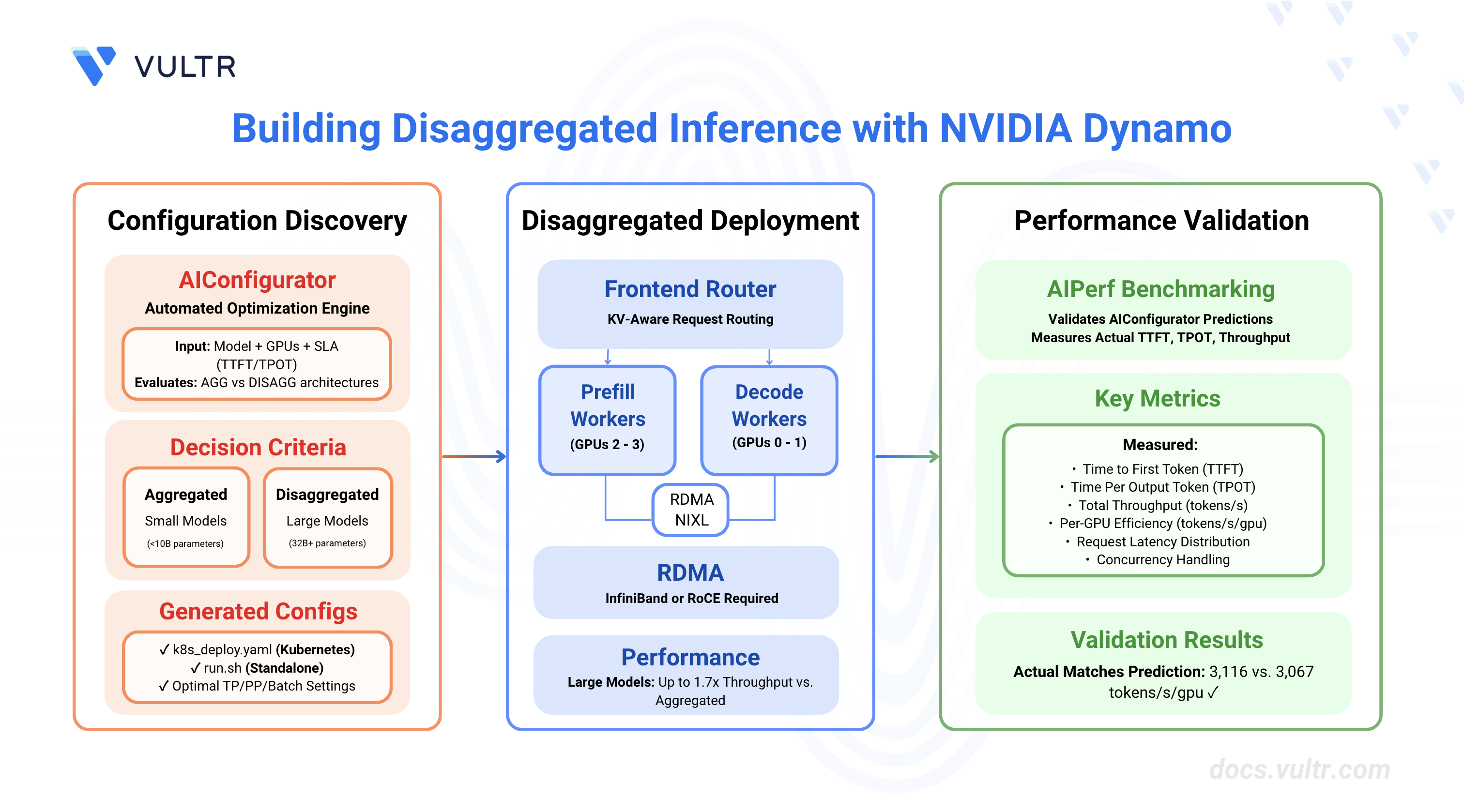
NVIDIA Dynamo is an open-source inference framework for deploying large-scale generative AI models across multi-node, multi-GPU environments. Disaggregated serving architecture separates prompt processing (prefill) and token generation (decode) phases across different GPU workers, enabling independent scaling and optimization of each phase based on their distinct computational characteristics.
This guide covers building disaggregated inference deployments with NVIDIA Dynamo using AIConfigurator for optimal configuration discovery, deploying on Kubernetes with RDMA, and validating performance. Disaggregated architecture can achieve up to 1.7x throughput improvement over aggregated serving for large models (32B+) with long input contexts. For smaller models, AIConfigurator automatically determines when aggregated serving is more efficient.
Prerequisites
Before you begin, ensure you have one of the following environments:
For Kubernetes Deployment:
- Kubernetes cluster with NVIDIA GPU nodes and RDMA device plugin installed.
kubectlconfigured to access your cluster.- RDMA-capable network (InfiniBand or RoCE).
- NVIDIA Dynamo platform installed on your cluster.
For Standalone Instance Deployment:
- Linux server with NVIDIA GPUs and NVIDIA Container Toolkit configured.
- 2+ GPUs for disaggregated serving.
- Docker Engine and Docker Compose.
- Non-root user with sudo privileges.
Common Requirements:
- Python 3.10+ for running AIConfigurator.
- Hugging Face account with access token for gated models.
Understanding Disaggregated Serving Architecture
Disaggregated serving splits LLM inference into two specialized phases, each optimized for different computational characteristics:
Prefill Phase vs Decode Phase
Architecture Components
Prefill Workers:
- Process incoming prompts and generate KV cache.
- Run with low batch sizes for optimal TTFT.
- Can use different tensor parallelism (TP) than decode workers.
- Transfer KV cache to decode workers via NIXL.
Decode Workers:
- Receive KV cache from prefill workers.
- Generate output tokens sequentially.
- Handle high concurrency with large batch sizes.
- Optimized for sustained token throughput
Request Routing:
- Frontend routes requests to available prefill workers.
- PrefillRouter selects prefill workers based on KV cache affinity.
- After prefill, decode workers receive KV cache and continue generation.
- NIXL enables GPU-to-GPU KV cache transfer with RDMA.
When to Use Disaggregated Serving
Use Disaggregated Serving When:
- Model size is large (32B+ parameters) - smaller models have lower KV cache transfer overhead that doesn't justify phase separation.
- Input sequence length (ISL) significantly exceeds output sequence length (OSL) - typically ISL > 4000 tokens.
- Workload requires independent scaling of prefill and decode capacity.
- RDMA-capable network infrastructure is available (critical requirement).
- Maximizing per-GPU throughput is the primary objective.
Use Aggregated Serving When:
- Model size is small (<10B parameters) - KV cache transfer overhead outweighs benefits.
- Balanced ISL/OSL ratios (between 2:1 and 10:1).
- Simpler deployment with lower operational complexity is preferred.
- RDMA infrastructure is not available.
- Strict latency SLAs require minimal inter-worker communication overhead.
Performance Benefits (for Large Models):
- Up to 1.7x higher throughput compared to aggregated serving for large models with long-context workloads.
- Better GPU utilization through phase-specific optimization.
- Independent scaling of prefill and decode resources based on workload patterns.
Note
RDMA is Required: Disaggregated serving requires RDMA for KV cache transfer. Without RDMA, performance degrades by 40x (TTFT increases from ~400ms to 10+ seconds) as the system falls back to TCP transfer, creating a severe bottleneck.
Install and Configure AIConfigurator
AIConfigurator is a performance optimization tool that automatically determines the optimal configuration for deploying LLMs with Dynamo by evaluating both aggregated and disaggregated architectures.
Create a Python 3 virtual environment.
CONSOLEActivate the virtual environment.
CONSOLEInstall AIConfigurator using pip.
CONSOLEVerify the installation.
CONSOLEThe output displays the installed version.
View available parameters and help documentation.
CONSOLE
Understanding AIConfigurator Parameters
AIConfigurator requires the following key parameters:
How AIConfigurator Works:
- Evaluates all possible configurations (tensor/pipeline parallelism combinations)
- Simulates performance for both aggregated and disaggregated architectures
- Filters configurations that meet SLA targets (TTFT, TPOT)
- Ranks results by per-GPU throughput (tokens/s/gpu)
- Automatically selects the best architecture (agg or disagg) based on actual performance
- Generates deployment manifests for top-ranked configurations
AIConfigurator considers factors like model size, KV cache transfer overhead, and GPU utilization to determine whether disaggregated serving will outperform aggregated for your specific workload.
Find Optimal Disaggregated Configuration
Use AIConfigurator to discover the best configuration for your model and hardware.
Run AIConfigurator with your model and system specifications.
CONSOLEThe command evaluates all possible configurations for 4× H200 GPUs with the specified model and SLA targets, generating deployment manifests in the
./results_vllmdirectory.Review the AIConfigurator output summary.
The summary shows that for this 4B model, aggregated serving performs better than disaggregated (3785.20 vs 3067.51 tokens/s/gpu). This is expected for smaller models where the overhead of KV cache transfer outweighs the benefits of phase separation. Disaggregated serving becomes advantageous with larger models (32B+) and longer context lengths.
Review the detailed configuration comparison.
Understanding the Output:
- tokens/s/gpu: Overall throughput efficiency - higher is better (agg: 3785.20 vs disagg: 3067.51 = agg is 23% faster)
- tokens/s/user: Per-request generation speed (inverse of TPOT)
- TTFT: Predicted time to first token (395.88ms for agg, 111.33ms for disagg prefill)
- concurrency: Total concurrent requests (e.g.,
256 (=64x4)= batch size 64 × 4 replicas) - parallel: Tensor/pipeline parallelism (tp=tensor parallel, pp=pipeline parallel)
- Result: For this 4B model, aggregated serving is more efficient due to lower overhead
Note
Model Size Matters: Disaggregated serving becomes advantageous with larger models (32B+) where the benefits of phase-specific optimization outweigh KV cache transfer overhead. For smaller models like this 4B example, aggregated serving is more efficient.
Examine the generated directory structure.
CONSOLEThe results are organized by model name and experiment parameters. While aggregated serving is optimal for this 4B model, the following sections demonstrate disaggregated deployment for learning purposes and larger model scenarios.
Deploy on Kubernetes
Note
While AIConfigurator determined that aggregated serving is optimal for this 4B model, the following sections demonstrate disaggregated deployment for learning purposes. Use disaggregated architecture when deploying larger models (32B+) or when AIConfigurator recommends it for your specific workload.
Kubernetes deployment provides the infrastructure for disaggregated serving with RDMA-accelerated KV cache transfer.
Install NVIDIA Dynamo Platform
Before deploying disaggregated workloads, install the NVIDIA Dynamo platform on your Kubernetes cluster. Follow the How to Optimize GPU Resource Planning with NVIDIA Dynamo guide to:
- Install the Dynamo Operator
- Configure GPU resource management
- Set up the DynamoGraphDeployment CRD
- Verify cluster readiness for Dynamo workloads
Prepare Kubernetes Environment
Set your Kubernetes namespace as an environment variable.
CONSOLEReplace
YOUR_NAMESPACEwith the namespace where you want to deploy Dynamo workloads.Create the namespace.
CONSOLEExport your Hugging Face token.
CONSOLEReplace
YOUR_HF_TOKENwith your Hugging Face access token.Create a Hugging Face token secret for accessing gated models.
CONSOLECreate a persistent volume claim for caching model weights.
CONSOLENote
This PVC uses
ReadWriteMany(RWX) access mode, which allows multiple pods to mount the volume simultaneously for shared model caching. Ensure your cluster has a StorageClass that supports RWX access mode (such as NFS, CephFS, or cloud-provider RWX storage). Verify available StorageClasses:CONSOLEApply the PVC configuration.
CONSOLEVerify the RDMA device plugin is running.
CONSOLEThe output should show RDMA device plugin pods running on GPU nodes. If not installed, follow the Mellanox RDMA device plugin installation guide.
Verify RDMA resources are available on your nodes.
CONSOLEReplace
NODE-NAMEwith your GPU node name. The output should showrdma/hca_shared_devicesresources:The
rdma/hca_shared_devices: "1k"entry confirms RDMA resources are available. If this resource is missing, verify the RDMA device plugin DaemonSet configuration and node labels.
Deploy Using Generated Manifests
Review the generated disaggregated deployment manifest.
CONSOLEThe file contains a
DynamoGraphDeploymentcustom resource with frontend, prefill workers, and decode workers configured according to AIConfigurator's recommendations.Create the complete deployment manifest with RDMA configuration.
CONSOLECritical RDMA Configuration:
rdma/hca_shared_devicesresources: Request RDMA resources matching tensor parallelism size (1 for both prefill and decode with TP1)IPC_LOCKcapability: Required for RDMA memory registrationPOD_UIDenvironment variable: Retrieves pod UID from metadata for worker identificationUCX_TLSenvironment variable: Enables RDMA transports (rc_x,dc_xfor InfiniBand)UCX_RNDV_SCHEME=get_zcopy: Enables zero-copy RDMA transfers for maximum performanceUCX_RNDV_THRESH=0: Forces RDMA usage for all message sizes--trust-remote-codeflag: Allows execution of custom model code from Hugging Face- CUDA 13 runtime: Uses
nvcr.io/nvidia/ai-dynamo/vllm-runtime:0.9.0-cuda13for GPU compatibility
Deploy the configuration to Kubernetes.
CONSOLEMonitor the deployment progress.
CONSOLEWait for all pods to reach
Runningstatus. This may take several minutes as models are downloaded and loaded.
Verify Kubernetes Deployment
Check pod status and resource allocation.
CONSOLEThe output shows all pods running successfully:
Verify RDMA is active by checking worker logs.
CONSOLEReplace
PREFILL-WORKER-PODwith your prefill worker pod name from the previous step. The output shows NIXL initialization logs:The key indicators confirm RDMA is working:
- "NIXL is available": NIXL connector initialized successfully
- "Backend UCX was instantiated": UCX backend (RDMA transport) is active
- "Initialized NIXL agent": NIXL agent ready for KV cache transfer
- "Registering KV_Caches": KV cache buffers registered for GPU-to-GPU transfer
Test inference through the frontend service.
CONSOLEIn a separate terminal, send a test request:
CONSOLEThe output displays the model's response in JSON format.
Monitor worker metrics to verify disaggregated flow.
CONSOLEThe output displays the metrics showing successful request processing:
Deploy on Standalone Instances
For standalone instance deployments (non-Kubernetes), refer to the backend-specific deployment guides that cover disaggregated serving:
- Deploy vLLM Disaggregated Serving: 2 prefill workers + 2 decode workers with NIXL-based KV cache transfer
- Deploy TensorRT-LLM Disaggregated Serving: TRT-LLM disaggregated configuration with KV cache optimization
- Deploy SGLang Disaggregated Serving: SGLang disaggregated setup with bootstrap_info transfer
These guides provide:
- Complete deployment scripts with environment variable configuration
- Container runtime setup with GPU allocation
- NIXL configuration for inter-worker KV cache transfer
- Verification steps and troubleshooting guidance
Validate Performance with AIPerf
After deployment, validate AIConfigurator's predictions against actual performance using AIPerf.
Install AIPerf benchmarking tool.
CONSOLEDerive AIPerf parameters from AIConfigurator output.
Values used for testing:
--concurrency 30(AIConfigurator recommends208for max throughput)--num-requests 800(Recommended:8320= concurrency × 40 for statistical stability)--isl 4000 --osl 500(Match your AIConfigurator inputs)--extra-inputs "ignore_eos:true"(Ensures exact OSL tokens generated)
Run AIPerf benchmark against the deployment.
CONSOLENote
The command above uses
--concurrency 30and--num-requests 800for early success and faster testing. For best throughput validation, use the recommended values:--concurrency 208and--num-requests 8320(concurrency × 40 for statistical stability).The benchmark runs 800 requests with 30 concurrent connections. The output displays performance metrics:
Compare actual vs predicted performance.
The per-GPU throughput (6,232.31 ÷ 2 GPUs = 3,116 tokens/s/gpu) closely matches AIConfigurator's prediction of 3,067.51 tokens/s/gpu. The total throughput (6,232.31 tokens/s) actually exceeds the prediction for 2 GPUs (6,135.02 tokens/s). This benchmark was run with 2 GPUs (1 prefill + 1 decode worker); scaling to 4 GPUs (2 prefill + 2 decode workers as shown in the deployment manifest) would double the throughput to approximately 12,464 tokens/s. The lower throughput compared to maximum capacity is due to using concurrency 30 instead of the recommended 208. The Inter Token Latency (3.75ms) significantly outperforms predictions, demonstrating efficient token generation.
Note
Run benchmarks inside the Kubernetes cluster (using a Job pod) to eliminate network latency. External benchmarking adds latency that affects TTFT measurements but provides realistic end-to-end performance metrics.
Understanding Request Flow in Disaggregated Mode
Understanding the request flow helps troubleshoot issues and optimize configuration.
Request Routing to Prefill Worker
- Frontend receives inference request.
- PrefillRouter selects prefill worker based on KV cache affinity and availability.
- Request is forwarded to selected prefill worker.
KV Cache Generation (Prefill Phase)
- Prefill worker loads model weights (shared via tensor parallelism).
- Processes entire input prompt in parallel.
- Generates KV cache for all input tokens.
- Generates first output token.
NIXL-Based KV Cache Transfer
- Prefill worker prepares KV cache for transfer.
- NIXL uses RDMA (InfiniBand
rc_xordc_xtransport) for GPU-to-GPU transfer. - Transfer metadata includes backend-specific information:
- vLLM:
kv_transfer_paramswith block IDs and GPU memory addresses. - SGLang:
bootstrap_infowith KV cache layout and tensor locations. - TRT-LLM:
opaque_statewith serialized KV cache metadata.
- vLLM:
Decode Worker Receiving KV Cache
- Decode worker receives KV cache via NIXL/RDMA.
- Registers received KV cache blocks in local memory manager.
- Verifies KV cache integrity (checksum validation).
- Prepares for token generation.
Token Generation on Decode Worker
- Decode worker generates subsequent tokens using received KV cache.
- Each token generation step is fast (compute-bound, not memory-bound).
- High batch size (256-1024) enables efficient GPU utilization.
- Continues until max_tokens or EOS token is reached.
Performance Characteristics:
- With RDMA: KV cache transfer takes 10-50ms for typical prompt sizes.
- Without RDMA: KV cache transfer takes 400-2000ms (40x slower), making disaggregated serving impractical.
- Prefill TTFT: ~350-450ms for 4000 token prompts.
- Decode TPOT: ~12-15ms per token with high concurrency.
Configuration Best Practices
GPU Allocation Strategies
Prefill Workers:
- Allocate fewer GPUs with higher memory bandwidth (memory-bound workload).
- Use lower tensor parallelism (TP1 or TP2) to minimize communication overhead.
- Deploy multiple replicas for higher prefill throughput.
Decode Workers:
- Allocate more GPUs for parallel token generation (compute-bound workload).
- Use higher tensor parallelism (TP4 or TP8) to distribute computation.
- Single replica with high batch size often performs best.
Example Configuration (4 GPUs):
- 2× Prefill workers with TP1 (2 GPUs total, 1 GPU each).
- 2× Decode workers with TP1 (2 GPUs total, 1 GPU each).
- Achieves balanced prefill and decode capacity with minimal tensor parallelism overhead.
Tensor Parallelism Considerations
Different TP settings for prefill and decode workers enable independent optimization.
Example: 4× H200 GPUs, 4B model
- For this small model, AIConfigurator recommends aggregated serving.
- Best agg config: TP1 with 4 replicas achieves 3785 tokens/s/gpu.
- Best disagg config: TP1 prefill + TP1 decode achieves 3067 tokens/s/gpu.
- Result: Aggregated is 23% faster due to lower overhead with small KV cache.
Batch Size Tuning
Prefill Workers:
- Use low batch size (1-4) for optimal TTFT.
- Higher batch sizes increase memory pressure and TTFT latency.
- Prefill throughput comes from multiple workers, not high batch size.
Decode Workers:
- Use high batch size (256-1024) for optimal throughput.
- Decode operations are compute-bound and benefit from high concurrency.
- Adjust based on available GPU memory and model KV cache requirements.
RDMA Requirements
Network Requirements:
- InfiniBand (preferred) or RoCE network with RDMA support.
- Sufficient bandwidth: 200 Gbps+ recommended for optimal performance.
- Low latency: <10μs for RDMA operations.
Configuration Requirements:
- RDMA device plugin installed on Kubernetes nodes.
rdma/hca_shared_devicesresources requested matching tensor parallelism size.IPC_LOCKcapability for memory registration.- UCX environment variables configured (see Kubernetes deployment section).
Verification:
- Check worker logs for "NIXL is available" and "Backend UCX was instantiated" messages.
- Monitor RDMA device utilization:
rdma resource show. - Measure RDMA bandwidth:
ib_write_bworrdma_bwtools.
When Disaggregated Serving Outperforms Aggregated
Disaggregated serving provides the greatest benefit in these scenarios:
Large Model Deployments (32B+ parameters):
- KV cache size is large enough that transfer benefits outweigh overhead.
- Phase-specific optimization yields significant throughput gains.
- Example: For a 32B model on 8 GPUs, disaggregated can achieve 1.31x better throughput.
Long Context Workloads (ISL > 4000):
- Prefill phase dominates overall latency.
- Specialized prefill workers optimize memory bandwidth.
- Decode workers can serve multiple requests concurrently.
High Throughput Requirements:
- Per-GPU throughput maximization is critical.
- Independent scaling of prefill and decode capacity.
- Workload patterns allow decode worker reuse across multiple requests.
Production Deployments with Variable Load:
- Scale prefill and decode workers independently based on demand.
- Optimize resource allocation per phase characteristics.
- Better handling of traffic spikes and batch processing scenarios.
When Aggregated Is Better:
- Small models (<10B parameters) - like the 4B example where agg is 1.23x faster.
- Balanced ISL/OSL ratios (2:1 to 10:1).
- Simpler operational model preferred.
- RDMA infrastructure not available.
- Strict latency SLAs with minimal overhead tolerance.
Conclusion
You have successfully used AIConfigurator to discover optimal configurations and deploy disaggregated inference with NVIDIA Dynamo. For this 4B model, aggregated serving performed 23% better, while larger models (32B+) benefit from disaggregated architecture with up to 1.7x throughput improvement. Disaggregated serving requires RDMA infrastructure for efficient KV cache transfer but enables superior per-GPU efficiency and independent scaling. Always follow AIConfigurator's recommendations and validate with AIPerf benchmarking for production deployments. For advanced configurations, refer to the official NVIDIA Dynamo documentation.


0 Comments
Be the first to comment and share your perspective with the community.