How to Upgrade PHP 8.2 to 8.3 on Ubuntu
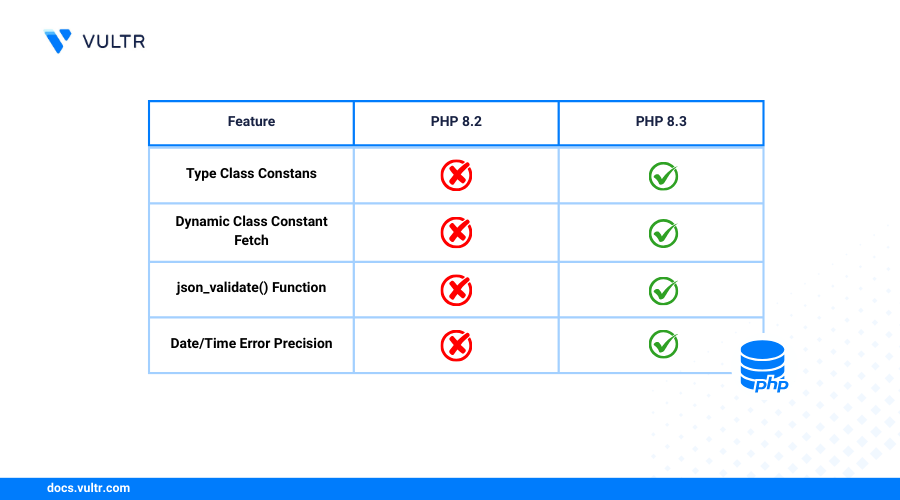
PHP is a widely used server-side scripting language for building dynamic websites and web applications. PHP offers performance enhancements, language improvements, and modern features with each new release. PHP 8.3 offers advanced capabilities over PHP 8.2 including explicit typing for class constants, readonly classes, deep cloning for readonly properties, and expanded function support.
This article explains how to upgrade PHP 8.2 to PHP 8.3 on Ubuntu 24.04. You will update the PHP repository sources, install PHP 8.3, install PHP-FPM and common PHP extenstions to use PHP with the Apache or Nginx web server.
Prerequisites
Before you begin, you need to:
- Have access to an Ubuntu 24.04 instance with PHP 8.2 already installed.
- Log in to the instance as a non-root user with
sudoprivileges to install new packages.
Add PHP PPA Repository
The default APT package repository sources include limited PHP versions on Ubuntu 24.04. Adding a PHP PPA repository to the APT sources lets you access multiple PHP versions including PHP 8.3 that may not be available in the default APT package sources. Follow the steps below to install Ondřej Surý’s PPA that provides access to updated PHP releases widely used in the PHP community.
Update the APT package index.
CONSOLEInstall all required dependency packages.
CONSOLEAdd the
ondrej/phpPPA to your APT repositories.CONSOLEUpdate the APT package index again.
CONSOLE
List Installed PHP 8.2 Modules
List all installed PHP 8.2 modules available on your system before upgrading to review all PHP 8.2 components to re-install with PHP 8.3 after the upgrade. Follow the steps below to review the list of actively installed PHP 8.2 modules before upgrading to PHP 8.3.
List all actively installed PHP modules.
CONSOLEList all installed PHP 8.2 related packages and save the list to a
packages.txtfile.CONSOLEYour output should be similar to the one below.
Install PHP 8.3
PHP 8.3 is available in the default APT package repositories and the PPA source you installed earlier. PHP relies on several system libraries and related software packages, such as the Apache HTTP server and SQLite drivers to run. Follow the steps below to install PHP 8.3 and all core dependencies.
Install PHP 8.3.
CONSOLEVerify the installed PHP 8.3 version.
CONSOLEYour output should be similar to the one below.
List all installed PHP versions.
CONSOLEVerify that both PHP 8.3 and PHP 8.2 are available similar to the following output.
Install PHP 8.3 Extensions
PHP-powered applications often rely on additional libraries and modules to interact with databases and other backend services. Follow the steps below to install common PHP 8.3 extensions.
Update the APT package index.
CONSOLERun the following command to install the commonly used PHP 8.3 extensions.
CONSOLEThe above command installs common PHP 8.3 extensions required by most applications. Add new extensions based on the PHP 8.2 extensions already installed on your system. Within the above command: Within the above command:
mbstring: Enables multibyte string support in PHP applications.pgsql: Enables access to PostgreSQL databases.mysql: Connects PHP applications to MySQL databases with improved connections.cgi: Enables support for CGI (Common Gateway Interface) scripts.gd: Enables image manipulation including resizing and cropping with the GD library.curl: Allows PHP to make HTTP requests using cURL.bz2: Adds support for Bzip2 compression in PHP applications.intl: Enables internationalization functions like formatting numbers and dates in PHP applications.
Install PHP 8.3 FPM
PHP-FPM is a process manager that runs PHP as a background service, handling requests from other applications such as web servers, resulting in improved performance. Follow the steps below to install PHP 8.3 FPM.
Update the APT package index.
CONSOLEInstall PHP 8.3 FPM.
CONSOLEVerify the installed PHP FPM version.
CONSOLEYour output should be similar to the one below.
Enable the PHP 8.3 FPM service to start at boot,
CONSOLEOutput:
Start the PHP 8.3 FPM service.
CONSOLEView the PHP 8.3 service status and verify that its running.
CONSOLEOutput:
Enable PHP 8.3 in Web Server Configurations
The PHP 8.3 FPM configuration is not enabled by default. Follow the steps modify your web server configurations to use PHP 8.3 instead of PHP 8.2.
Follow the steps below to configure the Apache web server to use PHP 8.3 FPM and disable the old PHP 8.2 configuration.
Enable the PHP 8.3 FPM configuration.
CONSOLEOutput:
Disable the PHP 8.2 FPM configuration.
CONSOLETest the Apache configuration for errors.
CONSOLEOutput:
Reload Apache to apply the configuration changes.
CONSOLEView the Apache service status and verify that it's active and running on your server.
CONSOLEOutput:
Optional: Uninstall PHP 8.2
Uninstalling PHP 8.2 allows you to use PHP 8.3 as the default PHP version, free up disk space and prevent PHP-FPM port conflicts on the localhost port 9000.
Remove the base PHP 8.2 package using APT.
CONSOLEPurge all packages related to PHP 8.2, deleting all extensions and configurations.
CONSOLERemove all unused dependencies.
CONSOLEVerify the active PHP version and verify that its PHP 8.3
CONSOLEOutput:
Conclusion
You have upgraded from PHP 8.2 to PHP 8.3 on Ubuntu 24.04. You installed essential PHP extensions, enabled PHP-FPM in your web server configurations and uninstalled PHP 8.2 to keep PHP 8.3 as the active version. You can run both PHP versions on the same server and switch configurations to PHP 8.3 or a newer installed version dependng on your project needs. Visit the PHP documentation for more information and advanced configuration options.


0 Comments
Be the first to comment and share your perspective with the community.