How To Add a Tag to Docker Image
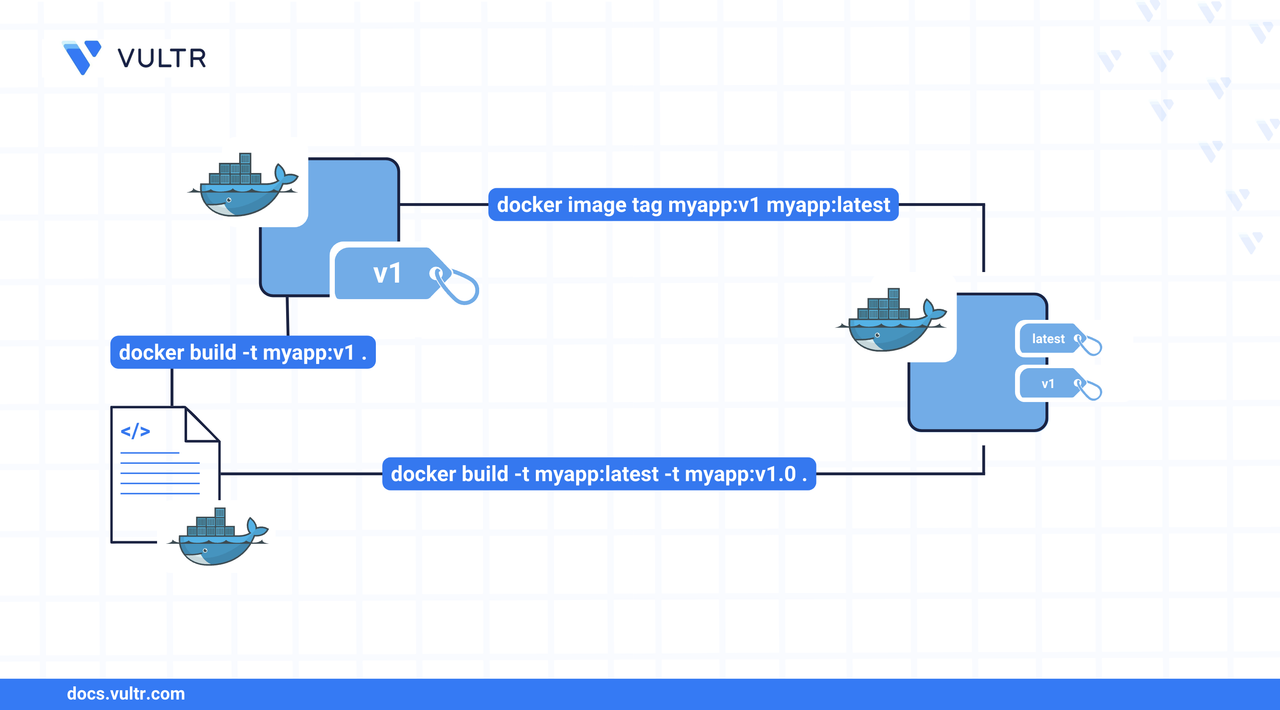
Docker tags let you assign meaningful names to container images, replacing unreadable IDs with clear, human-friendly references. This helps developers organize images by version, environment, or feature and ensures consistency across build, deployment, and collaboration workflows. In this article, you'll learn how to tag Docker images during and after the build process, apply multiple tags efficiently, and implement tagging best practices that integrate cleanly with version control and CI/CD pipelines.
The Short Answer Version
Tag a Docker Image During Build Process
You can assign a tag to a Docker image as soon as it’s built using the -t flag. This approach ensures the image is immediately labeled for its intended environment (e.g., staging or production), eliminating the need to re-tag it later.
Command Syntax
docker build: Builds an image from the Dockerfile in the current directory.-t: Tags the image with a human-readablerepository:tagidentifier..: Specifies the build context (usually the current directory).
You can extend it for multiple tags like:
-t repository_name:tag1: Applies the first tag.-t repository_name:tag2: Applies the second tag.
Command Demonstration
Build an image without a tag (creates an untagged image).
CONSOLEBuild the same image again with a staging tag.
CONSOLECreate another tag for the production environment.
CONSOLEList Docker images to view tagged and untagged entries.
CONSOLEOutput.
By tagging during build, you avoid the ambiguity of unnamed images (
<none>:<none>) and maintain clarity across environments.
Tag a Docker Image After Build Process
You can apply additional tags to an existing Docker image without rebuilding it. This is useful for versioning, staging, or applying environment-specific identifiers after the image is already built.
Command Syntax
docker image tag: The command to create a new tag for an existing image.SOURCE_IMAGE[:TAG]: The current name or image ID of the Docker image.TARGET_IMAGE[:TAG]: The new tag to assign to the image.
Command Demonstration
Tag an untagged image using its image ID.
CONSOLE6410385feccb: The image ID of the untagged image.myapp:dev: New tag to assign.
Tag an existing image with another version.
CONSOLEThis creates a new tag
v1.0pointing to the same image asmyapp:production.Verify that both tags now reference the same image.
CONSOLEOutput.
Docker creates lightweight references when tagging, no duplicate data is stored. This lets you build once and tag for multiple workflows.
Build a Docker Image with Multiple Tags
You can assign multiple tags to a Docker image during the build process using the -t flag repeatedly. This avoids the need to re-tag images afterward and ensures consistent versioning for different environments.
Command Syntax
-t repository_name:tag1: First tag to assign.-t repository_name:tag2: Additional tag(s).PATH: Location of the Docker build context (commonly.for current directory).
Command Demonstration
List current Docker images.
CONSOLEOutput.
Remove previous versions before rebuilding.
CONSOLEOutput.
Build a new image with all required tags.
CONSOLEConfirm the new image and tags.
CONSOLEOutput.
All tags now point to the same image ID, confirming a single image was built with multiple references, an efficient practice for CI/CD pipelines or release workflows.
Docker Image Tagging Best Practices
Effective Docker tagging improves image traceability, deployment automation, and team collaboration. This section outlines a tagging toolbox and actionable strategies to ensure consistent and reliable image management.
Tag Types to Use
Adopt a flexible tagging scheme to support multiple release flows:
Semantic Tags: Use
repository:1.2.3to clearly represent major, minor, and patch versions.Major/Base Version Tags: Tags like
repository:1,repository:2help track long-term support and major milestones.Feature Tags: Use tags such as
repository:lightwoodorrepository:huggingfaceto highlight variant characteristics.Combined Tags: Combine version and context, e.g.,
repository:2.1-redis, for extra clarity.Build or Commit Tags: Useful in CI/CD pipelines, e.g.,
repository:74667932,repository:sha-abc123.
Avoid Using :latest in Production
Avoid relying on the latest tag in production environments. It can introduce unpredictability when different team members or systems pull images without knowing the exact version.
CONSOLE
Use explicit, versioned tags instead. Reserve :latest only for development or internal use.
Use Unique Tags for Each Deployment
Assign unique tags per build to ensure reproducibility. This helps with audit trails, rollback, and artifact management.
Examples:
Maintain Stable Tags for Version Patching
Use stable tags for long-lived releases and minor updates. Update app:2.0 for security patches, and reassign latest to reflect the most recent stable version.
CONSOLE
Later, for a new minor release:
CONSOLE
Automate Tags with CI/CD Pipelines
Configure your CI/CD tools (e.g., GitHub Actions, Jenkins) to generate consistent and unique tags automatically.
YAML
Use commit hashes, branch names, or build IDs to ensure traceability.
Document and Enforce Tagging Conventions
Create and maintain a tagging guide in your repository. Define patterns for versioning, environments, and features.
INI
Include this in your README.md or contribution guidelines.
Conclusion
In this article, you learned how to tag Docker images during and after the build process, assign multiple tags efficiently, and apply best practices for versioning and environment-specific image management. These techniques help streamline team workflows, improve deployment consistency, and support automated CI/CD pipelines.
Tags:Docker


0 Comments
Be the first to comment and share your perspective with the community.