How to Install Nginx, MySQL, PHP (LEMP Stack) on Debian 12
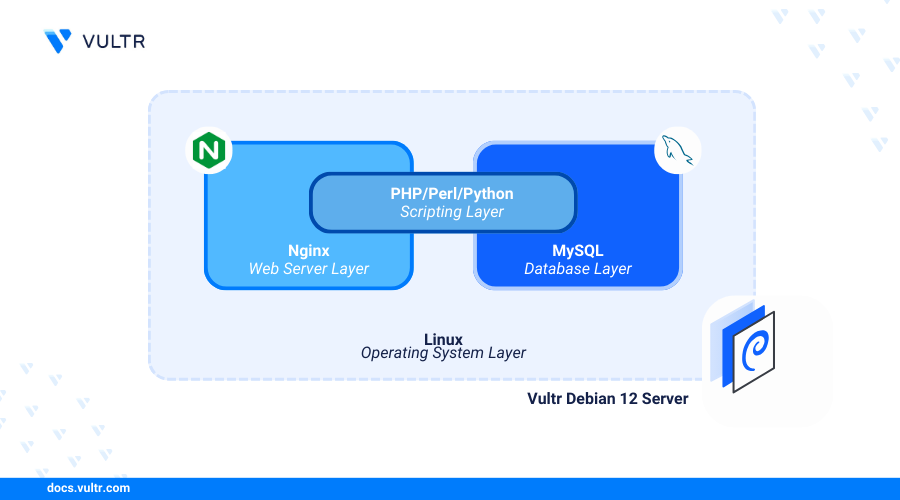
Introduction
Linux, Nginx, MySQL, and PHP (LEMP) Stack is a collection of open source applications that enable the development and deployment of web applications on a server. Linux works as the operating system, Nginx handles webserver functionalities, MySQL manages the database, and PHP processes dynamic web contents.
This article explains how to install the LEMP stack on Debian 12 to deliver dynamic web applications on the server.
Prerequisites
Before you begin:
- Deploy a Debian 12 instance on Vultr.
- Create a new domain A record pointing to the instance IP address.
- Access the instance using SSH as a non-root user with sudo privileges.
- Update the instance.
Install Nginx
Nginx is available in the default package repositories on Debian 12. Follow the steps below to install Nginx using the APT package manager on your server.
Install Nginx.
CONSOLEVerify the installed Nginx version.
CONSOLEOutput:
Enable Nginx to automatically start at boot.
CONSOLEStart the Nginx service.
CONSOLEView the Nginx service status and verify that it's running.
CONSOLEOutput:
Install MySQL
MySQL is not available in the default package repositories on Debian 12. Follow the steps below to add the MySQL repository information and install the database.
Download the latest MySQL package repository setup file.
CONSOLEVisit the MySQL APT repository page to verify the latest Debian package file to download on your server.
Run the file to install the latest MySQL repository information on your server.
CONSOLESelect the MySQL Server & Cluster option and press Enter when prompted.
Use Up and Down arrow keys to select your preferred MySQL server version and press Enter. For example, select
mysql-8.4-ltsversion.Press the Down arrow key to select Ok and press Enter to save changes.
Update the server's package index to apply the new MySQL package information.
CONSOLEInstall the MySQL database server package.
CONSOLEEnter a new
rootdatabase user password when prompted and press Enter.Enter the password again to validate it and press Enter to update the
rootdatabase user.
View the installed MySQL version on your server.
CONSOLEYour output should be similar to the one below.
Enable the MySQL service to automatically start at system boot.
CONSOLEStart the MySQL system service.
CONSOLEView the MySQL service status and verify that it's running on your server.
CONSOLEYour output should be similar to the one below.
Run the MySQL secure installation script to secure the database server.
CONSOLEEnter the
rootdatabase user password you set earlier and press Enter.Enter Y when prompted to setup the VALIDATE PASSWORD component.
Set the preferred password strength policy for your MySQL database server. For example, enter 2 to enable the use of strong passwords on your server.
Enter N when prompted to change the
rootdatabase user password, or enter Y to change the password.Enter Y when prompted to remove anonymous users on your MySQL database server.
Enter Y when prompted to disallow remote login for the
rootuser.Enter Y when prompted to remove the test database from your MySQL database server.
Enter Y to reload the MySQL privileges table and apply all configuration changes.
Output:
Install PHP and PHP-FPM
PHP is available in the default package repositories on Debian 12. Follow the steps below to install PHP, PHP-FPM, and recommended web application modules on your server.
Install PHP and PHP-FPM.
CONSOLEInstall PHP modules.
CONSOLEThe above command installs the following PHP modules:
php-mysql: Allows PHP to connect to the MySQL database server and perform SQL operations.php-cli: Enables PHP scripts to run in your terminal session.
View the installed PHP version on your server.
CONSOLEYour output should be similar to the one below.
Start the PHP-FPM service depending on your installed PHP version. For example, PHP
8.2.CONSOLEEnable PHP-FPM to start automatically at system boot.
CONSOLEView the PHP-FPM service status and verify that it's running.
CONSOLEOutput:
Configure PHP-FPM
PHP-FPM (FastCGI Process Manager) is a process manager for PHP that handles webserver requests for dynamic PHP applications. PHP-FPM offers several enhancements, including process management, server-specific configuration, and improved performance. Follow the steps below to configure PHP-FPM on your server.
Open the default PHP-FPM pool
www.confconfiguration using a text editor such asnano.CONSOLEView the PHP-FPM pool name and verify that it's set to
www.INIFind the following directives and verify that the values are set to
www-data.INIFind the
listendirective and verify that it is set to the PHP-FPM unix socket path/run/php/php8.2-fpm.sock.INIFind the following directives and modify the values depending on your server specifications and available resources.
pm: Specifies the process manager type. Thedynamicvalue allows PHP child processes to adjust automatically based on server needs.pm.max_children: Defines the maximum number of PHP child processes to run simultaneously.pm.start_servers: Sets the number of child processes created on startup, providing an initial pool to handle requests.pm.min_spare_servers: Sets the minimum number of idle child processes. If the number of idle processes is less than the specified value, new child processes are created.pm.max_spare_servers: Sets the maximum number of idle child processes allowed. If the number of idle child processes exceeds the specified value, the excess idle child processes are stopped.
Save and close the file.
Restart the PHP-FPM service to apply your configuration changes.
CONSOLE
Configure Nginx With PHP-FPM
Follow the steps below to configure Nginx to process PHP scripts by creating a new virtual host configuration that connects to the PHP-FPM service to process dynamic application requests.
Create a new virtual host configuration file in the
/etc/nginx/sites-available/directory.CONSOLEAdd the following contents to the file. Replace
app.example.comwith your actual domain.NGINXSave and close the file.
The above Nginx configuration creates a new virtual host that listens for connections using the
app.example.comdomain and delivers web application files from the/var/www/app.example.comdirectory. All PHP file requests are forwarded to the/var/run/php/php-fpm.sockPHP-FPM Unix socket for processing.Create a new symbolic link to the
/etc/nginx/sites-enabled/directory to activate the virtual host configuration.CONSOLETest the Nginx configuration for errors.
CONSOLEOutput:
Reload Nginx to apply the configuration changes.
CONSOLECreate a new web root directory to store your web application files.
CONSOLECreate a new
phpinfo.phpweb application file in the directory.CONSOLEAdd the following contents to the file.
PHPSave and close the file.
The above application displays the PHP information on your server when accessed using your virtual host's domain.
Allow HTTP connections through the firewall.
CONSOLEReload UFW to apply changes.
CONSOLEAccess the
/phpinfodomain path using a web browser such as Chrome.
Set Up Firewall Rules
Uncomplicated Firewall (UFW) is active and available on Vultr Debian servers by default. Follow the steps below to allow connections to the HTTP and HTTPS ports to enable Nginx deliver web application on the server.
View the UFW status and verify that it's active.
CONSOLEOutput:
Allow HTTP and HTTPS connections on the server using the
Nginx Fullservice profile.CONSOLEView the UFW status and verify that the new rules are available.
CONSOLEOutput:
Test the LEMP Stack Installation
Nginx processes HTTP requests and forwards them to PHP-FPM for handling. The php-mysql extension connects PHP to the MySQL database, enabling data retrieval and storage. Follow these steps to create a PHP application that displays a 'Greetings from Vultr' message retrieved from your MySQL database.
Log in to the MySQL database server as the
rootdatabase user.CONSOLECreate a new
test_dbdatabase.SQLSwitch to the
test_dbdatabase.SQLCreate a new sample database user
test_userwith a strong password. ReplaceStrong)P@ssword123with your desired password.SQLGrant the user full privileges to the
test_dbdatabase.SQLReload the MySQL privileges table to apply changes.
SQLCreate a new
greetingstable with two columns:id(for numeric data) andmessage(for text):SQLInsert a
Greetings from Vultrrecord into thegreetingstable.SQLQuery the
greetingstable to verify that the records are available.SQLOutput:
Exit the MySQL console.
SQLCreate a new PHP application file
greetings.phpin your/var/www/app.example.com/web root directory.CONSOLEAdd the following contents to the file.
PHPSave and close the file.
The above application code displays a
Greetings from Vultrmessage from the MySQL database when accessed using your virtual host's domain.Access the
/greetings.phpdomain path to test access to the PHP application.
Conclusion
You have installed the LEMP stack on your Debian 12 server. You set up Nginx as the webserver, MySQL as the database backend, and PHP with PHP-FPM to process dynamic web application contents. For more information and configuration options for each application within the stack, visit the following resources.


0 Comments
Be the first to comment and share your perspective with the community.