How to Use git fetch in Git
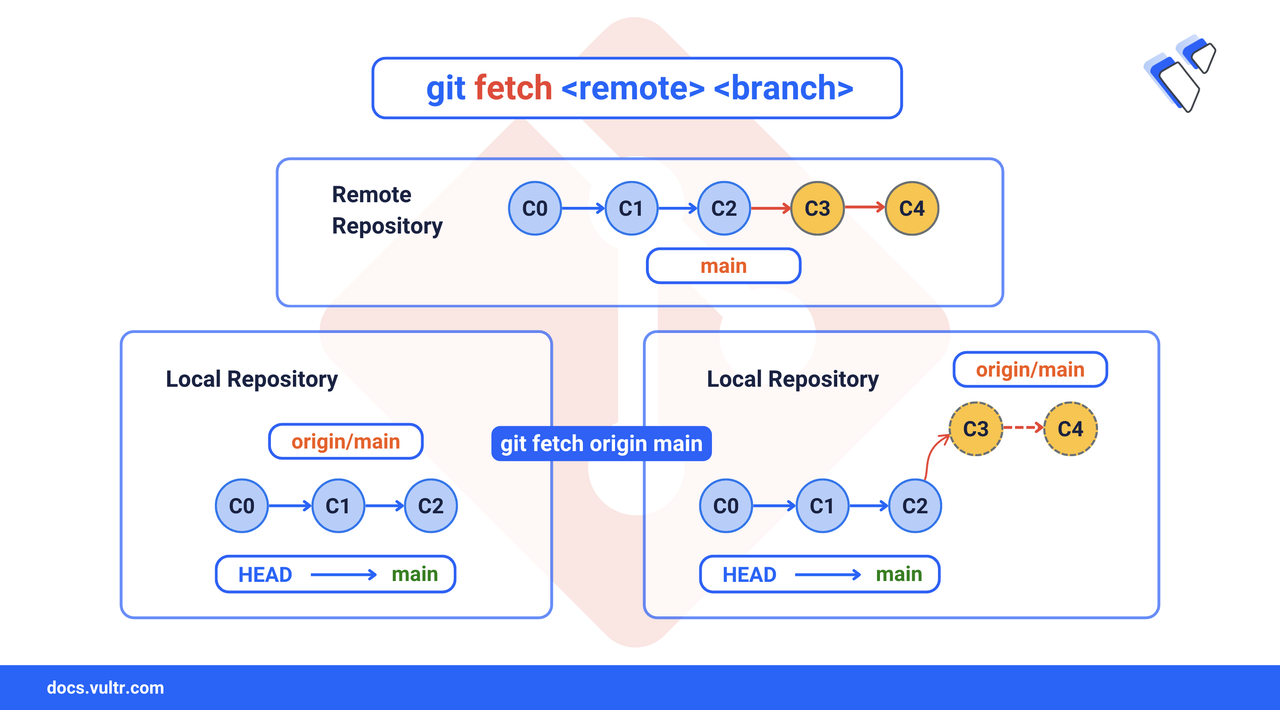
The git fetch command lets you review changes from a remote repository without modifying your local branches. It updates the remote-tracking branches and saves the details in FETCH_HEAD. After fetching, you can manually merge or rebase those changes into your local repository.
This article explains how to use git fetch to update from remote repositories, including specific branches, all remotes, and cleanup tasks.
The Short Answer Version
If you’re already familiar with Git and need quick reference commands for fetching updates:
Common Options for git fetch
The following are some commonly used flags to retrieve updates from remote repositories and manage remote-tracking branches:
Fetch All Remote Updates
Use git fetch command to retrieve the latest updates from a remote repository. This command shows all branches and commits in the remote repository and updates your remote-tracking branches without merging them into your local branches. It helps you review changes made by collaborators while keeping your local work unchanged until you choose to merge or rebase.
Command Syntax
Where <remote> is the remote repository you want to fetch changes from (for example, origin).
Command Demonstration
Make a change in the remote repository by editing a file or creating a new commit.
In your local repository, check the configured remotes.
CONSOLEIt lists all remote repositories by name along with their URLs.
Output:
Fetch updates from the remote repository.
CONSOLEIt fetches updates from all branches on the
originremote and refreshes their remote-tracking branches.Inspect the fetched changes.
CONSOLEgit logdisplays the commit history of a branch.Sample output:
Merge the new changes
CONSOLEgit mergemerges the changes you fetched.
Fetch a Specific Remote Branch
Using git fetch with a branch name retrieves updates from a specific remote-tracking branch on the remote repository. This is useful when you only want to review or integrate changes from one feature or topic branch, instead of fetching updates for all branches.
Command Syntax
Command Demonstration
Make changes to a remote branch in your remote repository and commit changes to the remote branch you want to fetch.
In your local repository, fetch a specific remote branch.
CONSOLEIt fetches updates only from the
feature-loginbranch on theoriginremote and updates your remote-tracking branchorigin/feature-login.Review the Fetched Branch
CONSOLEIt shows the commit history of the remote-tracking branch
origin/feature-login.Merge the remote branch into your local branch
CONSOLEIt merges the changes you fetched from the remote
feature-loginbranch into your current local branch.
Fetch From All Remotes
If your repository has multiple remotes, use the --all flag to fetch updates from all of them. This updates each remote-tracking branch so you can review or merge the changes locally.
CONSOLE
It fetches all changes from each remote and updates their remote-tracking branches so you can review or merge updates into your local branches.
Note
You can add --verbose to see detailed information about which branches and commits are being updated.
Clean Up Deleted Remote Branches
Sometimes, collaborators may delete branches from the remote repository. Run git fetch --prune to clean up stale references and avoid clutter in your branch list.
CONSOLE
It removes references to remote branches that no longer exist, without touching your local branches.
Conclusion
You’ve learned to use git fetch to review changes from remote repositories, fetch specific branches, update all remotes, and clean up deleted remote-tracking branches. These commands help you stay updated with collaborators’ work while keeping your local repository safe. For more details and advanced configuration options, refer to the official Git documentation.
Tags:Git


0 Comments
Be the first to comment and share your perspective with the community.